
linusbusiness.in

box p

BOXP BR85UE POS Printer

BOXP BR85UE POS Printer: Features, Speed & Benefits Contact Now Know More Fast and reliable receipt printing is essential for businesses handling a large number of customer transactions every day. The BOXP BR85UE POS Printer is a high-speed direct thermal receipt printer designed for demanding retail and billing environments. With printing speeds of up to 230 mm/s, USB and LAN connectivity, a long-life print head, and an integrated auto-cutter, the BOXP BR85UE is designed to support continuous billing operations in retail stores, restaurants, supermarkets, pharmacies, and other businesses. What Is the BOXP BR85UE POS Printer? The BOXP BR85UE POS Printer is a direct thermal POS receipt printer designed primarily for high-volume business billing. Instead of using traditional ink cartridges or toner, direct thermal printing uses heat to produce text and graphics on compatible thermal paper. This helps simplify receipt printing by eliminating the need for ink or toner cartridges. The BR85UE combines high-speed printing with business-focused connectivity, making it suitable for POS systems that require fast and consistent receipt generation. Key Features of the BOXP BR85UE POS Printer 230 mm/s High-Speed Printing One of the main advantages of the BOXP BR85UE POS Printer is its high printing speed of up to 230 mm/s. Fast receipt printing can help reduce waiting time at checkout counters, particularly in businesses that process a high number of transactions throughout the day. For supermarkets, restaurants, pharmacies, and busy retail stores, faster receipt generation can contribute to a smoother checkout workflow. Direct Thermal Printing Technology The BR85UE uses direct thermal printing technology. This printing method produces receipts by applying heat directly to compatible thermal paper. Since the process does not require ink cartridges, ribbons, or toner, businesses can simplify their receipt-printing setup. Direct thermal printing is commonly used for POS receipts, transaction records, tickets, and other short-term printed documents. Integrated Auto-Cutter The BOXP BR85UE features an integrated auto-cutter designed for regular transactional printing. After a receipt is printed, the cutter can separate the receipt from the paper roll, helping streamline the checkout process. This is particularly useful in environments where receipts are generated continuously throughout the working day. USB and LAN Connectivity Connectivity is an important consideration when selecting a POS receipt printer. The BR85UE provides USB and LAN (Ethernet) interfaces, allowing it to connect with compatible billing terminals and networked business environments. LAN connectivity can be particularly useful for businesses that need to position the printer within a networked POS setup. Long-Life Print Head The printer is designed with a long-life print head to support continuous day-to-day transactional printing. For businesses that depend on their POS printer throughout the working day, durability is an important factor when selecting printing equipment. Built for High-Volume Billing The BOXP BR85UE POS Printer is designed for continuous and heavy-duty transactional use. Its combination of high-speed printing, direct thermal technology, auto-cutting, and connectivity makes it suitable for businesses where receipts need to be generated quickly and consistently. Benefits of the BOXP BR85UE POS Printer Faster Checkout Operations Slow receipt printing can create unnecessary delays at busy billing counters. With speeds of up to 230 mm/s, the BR85UE can help businesses generate receipts quickly and keep checkout operations moving. This makes a high-speed POS printer particularly useful during busy periods when multiple customers are waiting to complete transactions. Lower Printing Maintenance Because the BR85UE uses direct thermal printing, businesses do not need traditional ink or toner cartridges for receipt printing. This can simplify printer maintenance and reduce the number of consumable components required for everyday receipt generation. Businesses still need to regularly replace thermal paper rolls and maintain the printer according to the manufacturer’s requirements. Convenient Receipt Cutting The integrated auto-cutter helps automate the receipt separation process. Instead of manually tearing each receipt from the paper roll, the printer can cut the printed receipt automatically, helping create a more efficient billing workflow. Flexible Business Connectivity USB connectivity provides a straightforward connection option for compatible POS systems. LAN connectivity adds networking flexibility for businesses that operate multiple terminals or require a network-connected printing environment. The exact connectivity setup should be confirmed based on the POS software and hardware being used. Suitable for Continuous Transactions Businesses such as supermarkets, restaurants, pharmacies, and retail stores can process a large number of transactions every day. The BOXP BR85UE POS Printer is designed around this type of high-volume transactional environment, providing fast printing and durable components for regular business use. BOXP BR85UE POS Printer for Retail Stores Retail stores need fast billing because customers generally expect a quick checkout experience. A POS printer for retail needs to produce clear receipts while keeping up with the billing system. The BOXP BR85UE can be integrated with compatible retail POS systems to print customer receipts after each transaction. Its high-speed printing and auto-cutter can be particularly useful at busy checkout counters. BOXP BR85UE POS Printer for Restaurants Restaurants and food-service businesses process orders and payments throughout the day. A thermal POS printer can be used to generate customer bills and transaction receipts without requiring ink cartridges. The BR85UE’s high-speed printing can help restaurants handle receipt generation efficiently during busy periods. Its compact POS-oriented design also makes it suitable for placement around billing counters where space and workflow efficiency matter. BOXP BR85UE POS Printer for Supermarkets Supermarkets often operate multiple billing counters and process a large number of transactions. A high-speed POS printer can help reduce receipt-printing delays at these counters. The BR85UE’s 230 mm/s printing capability, auto-cutter, and USB/LAN connectivity make it a suitable option to consider for high-volume supermarket billing environments. For multi-counter installations, LAN connectivity can provide additional flexibility where the POS infrastructure supports network printing. BOXP BR85UE POS Printer for Pharmacies Pharmacies require efficient billing and receipt printing as part of their daily customer service operations. The BR85UE can be used with compatible pharmacy billing systems to generate thermal receipts quickly. Its direct thermal printing technology eliminates the need for traditional ink or toner, making it a practical choice for regular receipt printing. Why Choose
box p

BOXP BP4206E Barcode Printer

BOXP BP4206E Barcode Printer: Features, Benefits & Business Applications Contact Now Know More Efficient barcode printing is essential for businesses that manage products, inventory, shipments, and identification labels. The BOXP BP4206E Barcode Printer is a compact and reliable printing solution designed to support demanding business environments. With high-speed performance, dual printing flexibility, industrial ribbon capacity, and smart IT integration, the BOXP BP4206E Barcode Printer can help businesses streamline barcode and label printing while maintaining an organized workflow. What Is the BOXP BP4206E Barcode Printer? The BOXP BP4206E Barcode Printer is a business-focused barcode printing machine designed for producing barcode labels and other identification labels. Its compact design makes it suitable for workplaces where counter or desk space is important, while its performance-focused features make it useful for regular business printing requirements. The BP4206E is designed around four key areas: High-speed printing performance Dual printing flexibility Industrial ribbon capacity Smart IT integration These features make the BOXP BP4206E Barcode Printer a practical option for businesses looking for a dependable barcode labeling solution. Key Features of the BOXP BP4206E High-Speed Barcode Printing Speed is important when barcode labels need to be generated continuously throughout the working day. The BOXP BP4206E Barcode Printer is designed for high-speed performance, helping businesses handle regular barcode and label printing without unnecessarily slowing down their workflow. Faster printing can be particularly useful in retail, inventory, logistics, warehousing, and other environments where labels are required frequently. Dual Printing Flexibility One of the key highlights of the BP4206E Barcode Printer is its dual printing flexibility. This provides businesses with greater flexibility when selecting their printing setup and can make the printer suitable for different barcode and label printing requirements. Having printing flexibility can be useful for businesses that handle multiple types of labels as part of their daily operations. Industrial Ribbon Capacity The BP4206E is designed with industrial ribbon capacity, making it suitable for businesses that require consistent printing performance. Ribbon capacity is an important consideration for thermal printing environments because frequent ribbon replacement can interrupt the workflow. For businesses handling regular label production, a suitable ribbon configuration can help maintain a smoother printing process. Smart IT Integration Modern businesses often need their printing hardware to work alongside existing computer systems and business software. The BOXP BP4206E Barcode Printer is designed with smart IT integration in mind, making it suitable for business environments where barcode printing needs to form part of an existing technology workflow. This can help businesses connect barcode printing with their broader operational processes. Benefits of Using a BOXP BP4206E Barcode Printer Improve Barcode Printing Efficiency Manual labeling can consume significant time, especially when businesses handle a large number of products. Using a dedicated barcode printer allows businesses to generate labels more efficiently and maintain a consistent labeling process. The BP4206E’s high-speed performance makes it suitable for businesses that need regular barcode printing. Support Organized Inventory Management Barcodes make it easier to identify products and maintain organized inventory records. A dedicated barcode label printer can help businesses produce product identification labels that can be used alongside barcode scanners and inventory management systems. This can make stock handling and product identification more structured. Suitable for Different Business Environments The BOXP BP4206E Barcode Printer can be considered for a range of business applications where barcode and label printing is required. Potential applications include: Retail stores Supermarkets Warehouses Logistics operations Inventory management Distribution businesses Product labeling Stock management Commercial offices The exact suitability depends on the business’s label requirements and existing software or hardware setup. Barcode Printing for Retail Businesses Retail businesses deal with products that need clear identification for pricing, inventory, and checkout operations. A barcode printer for business can help retailers create and manage product labels more efficiently. The BOXP BP4206E can be incorporated into a retail workflow alongside barcode scanners, POS systems, inventory software, and other business equipment. This can help create a more organized product identification process from stock receiving through to checkout. Barcode Printing for Warehouses Warehouses often manage large numbers of products and packages. Clear barcode labels can help staff identify products and track inventory more efficiently. The BOXP BP4206E Barcode Printer can support warehouse operations where regular barcode label printing is required. Its compact design can also be useful where workspace around packing or inventory stations is limited. Barcode Printing for Logistics Logistics operations depend heavily on accurate identification of packages and shipments. Barcode labels can contain information used to identify and process packages throughout different stages of the logistics workflow. A reliable barcode label printer can therefore become an important part of shipping and dispatch operations. The BP4206E can be considered for businesses that require consistent barcode printing for their logistics workflow. Why Choose the BOXP BP4206E Barcode Printer? Choosing the right barcode printer depends on factors such as printing speed, label requirements, connectivity, printing technology, operating environment, and expected printing volume. The BOXP BP4206E Barcode Printer focuses on four important business requirements: Speed: Designed for high-speed printing performance. Flexibility: Provides dual printing flexibility for different business requirements. Capacity: Features industrial ribbon capacity for regular printing workflows. Integration: Designed to support smart IT integration within business environments. Together, these features make the BP4206E a practical option for businesses looking for a compact and performance-oriented barcode printing solution. How a Barcode Printer Helps Your Business A dedicated barcode printer can improve several parts of a business workflow. Faster Label Production Instead of manually preparing product identification labels, businesses can generate barcode labels using a dedicated printer. Consistent Labeling Digital barcode printing helps maintain consistency across product and inventory labels. Better Product Identification Barcode labels allow products to be identified quickly using compatible barcode scanners. Improved Inventory Workflow When barcode printers, scanners, POS systems, and inventory software work together, businesses can create a more structured inventory management process. Reduced Manual Data Entry Barcode-based workflows can reduce the amount of repetitive manual product identification and data entry required during daily operations. BOXP BP4206E for Barcode and Label Printing The BOXP BP4206E Barcode Printer

Essae

Essae SI-810 Tank Weighing System

Essae SI-810 Tank Weighing System: Features & Benefits Contact Now Know More Accurate weighing is essential in industries that handle liquids, raw materials, chemicals, powders, and other bulk materials. The Essae SI-810 Tank Weighing System is a heavy-duty industrial weighing solution designed to convert storage tanks, silos, and process vessels into accurate digital weighing systems. Using high-precision multi-load cell technology, the Essae SI-810 provides a practical approach to measuring the contents of large vessels. Its rugged IP67 alloy steel load cells, wide capacity range, and maintenance-friendly design make it suitable for demanding industrial environments. What Is the Essae SI-810 Tank Weighing System? The Essae SI-810 Tank Weighing System is an industrial weighing solution designed to measure the weight of materials stored inside tanks, silos, and process vessels. Instead of placing the entire vessel on a conventional platform weighing scale, a tank weighing system uses load cells installed as part of the vessel’s support structure. The SI-810 uses multi-load cell technology to provide accurate weight measurement for industrial storage and process applications. This makes it useful for businesses that need to monitor material quantities directly within tanks or vessels. Key Features of the Essae SI-810 High-Precision Multi-Load Cell Technology The Essae SI-810 Tank Weighing System uses high-precision multi-load cell technology to measure the weight of materials contained within large vessels. Multiple load cells can distribute the load across the vessel structure, providing a suitable weighing arrangement for tanks, silos, and process vessels. This approach is particularly useful where conventional platform scales are not practical. IP67 Alloy Steel Load Cells The SI-810 uses rugged IP67 alloy steel load cells designed for demanding industrial environments. The IP67 protection rating provides resistance against dust ingress and water exposure under specified conditions. The alloy steel construction provides a durable load-cell solution for industrial weighing applications. 300 kg to 30,000 kg Capacity The Essae SI-810 supports a broad weighing range from 300 kg to 30,000 kg, according to the product information provided. This capacity range allows the system to be considered for different tank sizes and industrial weighing requirements. Businesses can select an appropriate configuration based on vessel size, material weight, and their specific process requirements. Easy-Maintenance Design Industrial equipment needs to be maintainable because unnecessary downtime can affect production. The SI-810 features built-in screw-jacks that allow servicing and maintenance without requiring complete tank removal. This design can simplify maintenance procedures and help reduce disruption to industrial operations. Optional Flameproof Consoles For applications involving hazardous chemical environments, the system can be configured with optional flameproof consoles. This provides an additional configuration option for industries where equipment needs to be selected according to the site’s safety and hazardous-area requirements. The exact suitability should always be evaluated according to the site’s applicable safety standards and installation requirements. Benefits of Using the Essae SI-810 Tank Weighing System Accurate Tank and Vessel Weighing The Essae SI-810 Tank Weighing System allows businesses to measure material quantities directly through the weighing structure supporting a tank or vessel. This can provide better visibility into stored material levels compared with relying solely on manual estimation. Suitable for Large Industrial Vessels Traditional weighing platforms are not always practical for large storage tanks and process vessels. A tank weighing system provides an alternative approach by integrating weighing components into the vessel’s support arrangement. The SI-810 is designed specifically for this type of industrial application. Wide Capacity Range With a capacity range of 300 kg to 30,000 kg, the SI-810 can support a variety of industrial weighing requirements. This makes it suitable for applications involving different vessel sizes and material quantities. Reduced Maintenance Downtime The built-in screw-jack design allows maintenance access without requiring complete tank removal. For industrial operations, easier servicing can help simplify maintenance planning and reduce unnecessary equipment disruption. Durable Industrial Construction The IP67 alloy steel load cells provide a rugged solution for industrial weighing environments. Durability is particularly important in manufacturing and process environments where equipment may be exposed to dust, moisture, vibration, or demanding operating conditions. Tank Weighing System Applications The Essae SI-810 Tank Weighing System can be considered for several industrial applications where accurate vessel weighing is required. Storage Tanks Storage tanks can be equipped with weighing components to monitor the quantity of material stored inside. This can help businesses track inventory without manually estimating the contents. Silos Silos used for storing bulk materials can benefit from weighing systems that provide information about the material remaining inside. This can support inventory management and material replenishment planning. Process Vessels Manufacturing processes often require specific quantities of raw materials or ingredients. A tank weighing system can help monitor material quantities during production processes. Chemical Industries Industrial chemical processes may require accurate measurement of materials stored or processed within vessels. For hazardous environments, appropriate flameproof configurations and site-specific safety requirements should be considered. Manufacturing Plants Manufacturing facilities can use tank weighing systems for monitoring raw materials, intermediate products, and bulk materials used during production. How Does a Tank Weighing System Work? A tank weighing system typically uses load cells positioned between the tank or vessel and its supporting structure. As the quantity of material inside the vessel changes, the load applied to the load cells changes accordingly. The weighing system measures these load changes and converts them into weight information. The Essae SI-810 uses multiple load cells to create a weighing arrangement suitable for tanks, silos, and process vessels. The exact installation configuration depends on the vessel design, support structure, capacity, and application. Why Use Load Cells for Tank Weighing? Load cells are important components in industrial weighing systems because they convert mechanical load into an electrical signal that can be interpreted as weight. Using multiple load cells can help distribute the vessel load across several measurement points. The Essae SI-810 Tank Weighing System uses high-precision multi-load cell technology to support accurate industrial weighing. This makes load-cell-based weighing particularly useful for large vessels that cannot conveniently be placed on conventional weighing platforms. Advantages Over Conventional Platform Scales A conventional platform scale is useful when

Trucount

Trucount Handy-30L Billing Machine

Trucount Handy-30L Billing Machine: Features & Benefits Contact Now Know More Businesses that need to generate bills away from a traditional checkout counter require a billing solution that is compact, reliable, and easy to carry. The Trucount Handy-30L Billing Machine is a portable, battery-operated electronic billing machine and cash register designed for fast billing, spot invoicing, and mobile business operations. With 10 to 16 hours of battery backup, hot-key operation, a compact mobile design, and PC connectivity, the Trucount Handy-30L provides businesses with a practical solution for billing on the go. What Is the Trucount Handy-30L Billing Machine? The Trucount Handy-30L Billing Machine is a compact and portable electronic billing machine designed for businesses that need to process transactions away from a fixed billing counter. Unlike conventional countertop billing machines, its portable design allows operators to carry the device and generate invoices at different locations. The battery-operated design makes it useful for businesses where access to continuous power may not always be convenient. Key Features of the Trucount Handy-30L 10 to 16 Hours of Battery Backup One of the key advantages of the Trucount Handy-30L Billing Machine is its battery-powered operation. The product specification highlights 10 to 16 hours of battery backup, depending on usage and operating conditions. This extended battery capability can be useful for businesses that need to perform billing throughout a working day without being continuously connected to a power source. Fast Hot-Key Billing The Handy-30L features hot-key operation for convenient billing. Hot keys allow operators to access frequently used billing functions quickly through dedicated physical buttons. For businesses processing repeated transactions, this type of interface can make billing more straightforward and reduce unnecessary manual steps. Compact and Portable Design The Trucount Handy-30L is designed specifically for mobile billing. Its compact form factor makes it easier to carry compared with larger countertop electronic cash registers. This makes the device particularly relevant for businesses that need to generate bills at different locations rather than from a single permanent checkout counter. Spot Invoicing The Handy-30L is designed for spot invoicing, allowing businesses to generate bills where the transaction takes place. This can be useful when the customer is not physically standing at a traditional checkout counter. Mobile invoicing can help businesses complete transactions more efficiently while reducing the need to manually record sales for later billing. PC Connectivity The Trucount Handy-30L Billing Machine provides connectivity with a PC. PC connectivity can be useful for transferring or managing relevant billing information, depending on the machine’s configuration and supported software. This can also help businesses maintain billing records and integrate the device into their existing workflow. Benefits of Using the Trucount Handy-30L Billing Machine Billing Without a Fixed Counter A major advantage of a portable billing machine is the ability to process transactions away from a traditional billing desk. The Handy-30L can be carried to the location where the transaction takes place, making it suitable for mobile or distributed business operations. Convenient Mobile Billing The compact design and battery operation make the Trucount Handy-30L Billing Machine convenient for mobile billing requirements. Businesses can use a portable device instead of carrying a larger countertop billing system between locations. Long Battery Operation With up to 10–16 hours of battery backup, the Handy-30L is designed to support extended mobile billing operations. This can be particularly useful during long working periods, outdoor business activities, or locations where continuous access to electrical power is limited. Faster Transaction Processing Hot-key functionality provides operators with quick access to frequently used billing functions. For businesses that process multiple transactions, a dedicated physical interface can help maintain a consistent billing workflow. Easy Spot Invoicing Spot invoicing allows businesses to generate invoices closer to the point where products or services are sold. This can reduce the need to write down transaction details and enter them into another billing system later. Who Can Use the Trucount Handy-30L? The Trucount Handy-30L Billing Machine is best suited to businesses where billing needs to happen away from a fixed counter. Mobile Retail Businesses Mobile retailers can use a portable billing machine to generate invoices while serving customers at different locations. Delivery-Based Businesses Businesses that need to complete billing during delivery or customer visits can benefit from a compact battery-operated billing solution. Field Sales Operations Sales representatives and field operators can use mobile billing equipment when transactions need to be processed directly at customer locations. Temporary Sales Counters Businesses operating temporary counters, exhibitions, events, or short-term sales locations can benefit from a portable billing system. Businesses With Multiple Selling Locations Where billing takes place at different points within a business operation, a portable electronic cash register can provide greater flexibility than a fixed countertop machine. What Makes a Portable Billing Machine Different? A conventional billing machine is generally designed to remain at a permanent checkout counter. A portable billing machine, on the other hand, is designed around mobility. The Trucount Handy-30L Billing Machine combines: Battery-powered operation 10–16 hours battery backup Compact design Hot-key billing Spot invoicing PC connectivity These features make it particularly suitable for businesses that require billing flexibility. Why Battery Backup Matters in a Billing Machine Power availability can be an important consideration for businesses operating outside traditional retail environments. A battery-operated billing machine can continue supporting transactions without requiring the device to remain connected to a power outlet. The Handy-30L’s stated 10–16 hour battery backup provides flexibility for extended billing operations. Actual battery duration can vary depending on usage and operating conditions. How Hot Keys Improve Billing Hot keys provide dedicated physical buttons for frequently used functions. Instead of navigating through multiple menus for every transaction, an operator can use the relevant key directly. For businesses that process repeated sales, this can help create a faster and more consistent billing workflow. The Trucount Handy-30L Billing Machine is designed with hot-key operation specifically to support convenient billing. Portable Billing Machine vs. Traditional Cash Register A traditional electronic cash register is generally installed at a fixed location. A portable system offers greater mobility. Feature

Trucount

Trucount T10 Billing Machine

Trucount T10 Billing Machine: Features, Benefits & Uses Contact Now Know More Efficient billing is essential for businesses that handle frequent customer transactions. The Trucount T10 Billing Machine is a compact electronic billing machine designed for fast counter sales, thermal receipt printing, product management, and daily business reporting. With a built-in 2-inch thermal printer, accessible alphanumeric keyboard, PLU storage, sales reporting, GST/tax support, and USB or pen drive connectivity, the Trucount T10 provides a practical billing solution for retail businesses. What Is the Trucount T10 Billing Machine? The Trucount T10 Billing Machine is an electronic cash register designed to simplify everyday billing operations. It combines a built-in thermal printer, physical alphanumeric keyboard, product PLU storage, reporting functions, and data-transfer capabilities in a compact countertop unit. The machine is designed for businesses that need a dedicated billing system for processing sales and generating customer receipts without relying on a conventional desktop computer for every transaction. Key Features of the Trucount T10 Built-In 2-Inch Thermal Printer The Trucount T10 features a built-in 2-inch thermal printer for generating customer receipts and invoices. The product information highlights printing speeds of approximately 40–60 mm/sec, allowing businesses to produce receipts quickly during busy counter operations. Thermal printing also eliminates the need for conventional ink ribbons, making routine receipt printing convenient. Compact Alphanumeric Keyboard The T10 features an accessible alphanumeric keyboard with approximately 32 to 43 keys, depending on the configuration. A physical keyboard gives billing operators dedicated controls for product entry, programming, and transaction processing. For businesses where employees perform repeated billing operations throughout the day, a physical keypad can provide a straightforward and familiar workflow. PLU Item Storage Product information can be stored in the T10 through PLU functionality. PLU, or Price Look-Up, allows frequently sold products to be programmed into the billing machine. Operators can then access stored products during transactions instead of entering product information manually every time. This can make repetitive billing more efficient for retail businesses. Sales Reporting and Tax Support The Trucount T10 Billing Machine supports sales reporting and tax-related reporting functions. The product information highlights daily and monthly sales reports along with GST/tax reports. These reports can help business owners review sales activity and maintain useful records for their day-to-day operations. USB and Pen Drive Connectivity The T10 supports USB/pen drive connectivity, allowing businesses to transfer relevant data using a standard flash drive. This can be useful for activities such as data backup, software updates, and report downloads, depending on the system configuration. Benefits of Using the Trucount T10 Billing Machine Faster Counter Billing Fast thermal printing combined with a dedicated physical keyboard can help businesses process customer transactions efficiently. For busy retail counters, reducing unnecessary steps can improve the overall checkout workflow. Convenient Receipt Printing The integrated 2-inch thermal printer means businesses do not need to purchase a separate receipt printer for standard billing operations. This keeps the billing setup compact and makes receipt generation part of the main machine. Easier Product Management PLU storage allows frequently sold products to be programmed into the system. Instead of manually entering product details for every transaction, operators can access the relevant stored item. This can be particularly useful for retail stores with a recurring catalogue of products. Useful Sales Reports Daily and monthly sales reports give businesses a way to review their transaction activity. Regular reporting can help owners understand sales performance and maintain business records. GST and Tax Reporting The Trucount T10 Billing Machine includes GST/tax reporting support according to the provided product information. For Indian retail businesses, having tax-related billing and reporting functionality can be useful for maintaining organized transaction records. Simple Data Backup and Transfer USB and pen drive connectivity provides a convenient way to move data between the billing machine and external storage. Businesses can use this capability for supported report downloads, backups, and software-related updates. Who Can Use the Trucount T10? The Trucount T10 Billing Machine can be suitable for a range of retail and commercial businesses. Retail Stores Retail shops can use the T10 for product billing, receipt printing, PLU management, and sales reporting. Grocery and Provision Stores Businesses with recurring product sales can benefit from PLU-based billing and dedicated thermal receipt printing. Supermarkets Smaller supermarkets can use stored product information and sales reporting to support everyday billing operations. Pharmacies Pharmacies can use a suitable billing configuration for processing product transactions and generating receipts. General Business Counters Any business requiring a dedicated electronic cash register for regular counter sales can consider the T10 based on its operational requirements. What Is PLU in a Billing Machine? PLU stands for Price Look-Up. A PLU system allows products and their pricing information to be programmed into the billing machine. For example, a retail store can assign a PLU to a frequently sold product. When that product is purchased, the operator can select the stored item rather than manually entering all the relevant information. This can reduce repetitive data entry and help speed up billing. The Trucount T10 Billing Machine supports PLU item storage, making it useful for businesses that sell multiple products regularly. How Does GST Reporting Help Businesses? GST-related billing and reporting are important considerations for many businesses operating in India. A billing machine with GST/tax support can help businesses organize relevant transaction information and generate supported tax reports. The Trucount T10 includes GST/tax reporting functionality, making it relevant for businesses that need tax-aware billing operations. However, businesses should always ensure that their billing configuration and reporting process meet their current accounting and tax requirements. Why Thermal Printing Is Useful for Retail Billing Thermal printing is widely used for customer receipts because it provides fast, direct printing without conventional ink ribbons. The T10’s 2-inch thermal printer is designed for everyday receipt generation, with a stated printing speed of approximately 40–60 mm/sec. For a busy billing counter, quick receipt printing can help reduce waiting time between transactions. Trucount T10 vs. Basic Billing Machines A basic billing machine may offer simple transaction entry and receipt printing. The

Trucount

Trucount ZIP 20 Billing Machine

Trucount ZIP 20 Billing Machine: Features, Benefits & Uses Contact Now Know More Fast and reliable billing is essential for businesses that handle regular customer transactions. The Trucount ZIP 20 Billing Machine is a compact semi-automatic electronic billing machine designed to simplify checkout, manage product information, and support daily sales operations. With high-speed 2-inch thermal printing, 1,000 PLU capacity, a 63-key alphanumeric keyboard, and multiple device connectivity options, the Trucount ZIP 20 provides a practical billing solution for growing retail businesses. What Is the Trucount ZIP 20 Billing Machine? The Trucount ZIP 20 Billing Machine is a semi-automatic electronic cash register and thermal billing machine designed for retail and commercial businesses. Its compact design makes it suitable for billing counters where businesses need dedicated billing equipment without taking up excessive workspace. The machine combines a physical alphanumeric keyboard, integrated thermal printer, product storage, sales reporting, and connectivity for compatible peripherals such as barcode scanners, weighing scales, and cash drawers. Key Features of the Trucount ZIP 20 High-Speed 2-Inch Thermal Printing The Trucount ZIP 20 features an integrated 2-inch thermal printer designed for fast receipt generation. The product specification highlights a printing speed of 40–60 mm/sec, allowing businesses to generate customer invoices efficiently during everyday transactions. Thermal printing also eliminates the need for conventional ink during standard thermal receipt printing, making it convenient for busy billing counters. 1,000 PLU Capacity The ZIP 20 can store and manage up to 1,000 distinct items or departments through its PLU functionality. PLU, or Price Look-Up, allows businesses to store product information so that frequently sold items can be accessed quickly during billing. For small and growing retail businesses, 1,000 PLU capacity can provide sufficient room for maintaining a sizeable product catalogue. 63-Key Alphanumeric Keyboard The Trucount ZIP 20 Billing Machine features a 63-key alphanumeric keyboard designed for convenient billing operations. A physical keyboard can be particularly useful for operators who process repeated transactions throughout the day. Dedicated keys can help operators access products and billing functions without relying entirely on manual data entry. USB, Serial and Parallel Connectivity The ZIP 20 provides multiple connectivity options, including: USB Serial Parallel Multiple connection interfaces provide flexibility when integrating compatible business peripherals. The machine is designed to work with devices such as barcode scanners, weighing scales, and cash drawers, depending on compatibility and configuration. Barcode Scanner Connectivity Businesses with barcode-based inventory can connect a compatible barcode scanner to the billing machine. Barcode scanning can speed up product identification and reduce the need for manual product entry during checkout. This can be especially useful for retail stores with a large number of packaged products. Weighing Scale Connectivity The ZIP 20 can also connect with a compatible weighing scale. This is useful for businesses selling products based on weight, such as grocery stores, provision stores, and other retail outlets. Integrating weighing into the billing workflow can make weight-based transactions more convenient. Cash Drawer Connectivity The machine supports connectivity with a compatible cash drawer, allowing businesses to organize cash handling at the billing counter. Combining the billing machine and cash drawer creates a more structured checkout environment. Benefits of Using the Trucount ZIP 20 Faster Checkout Fast thermal printing combined with stored PLUs and a dedicated physical keyboard can help streamline everyday billing. For businesses processing multiple transactions, reducing unnecessary manual entry can make checkout more efficient. Manage Up to 1,000 Items The 1,000 PLU capacity gives businesses room to store a substantial product catalogue. This can be useful for retailers that have hundreds of products but don’t yet require the much larger product capacity of a full-scale POS system. Reduced Manual Data Entry Stored PLUs and optional barcode scanner connectivity can reduce repetitive manual product entry. This can help improve billing speed and reduce the possibility of simple data-entry mistakes. Flexible Peripheral Integration USB, serial, and parallel interfaces give businesses different options for connecting compatible peripherals. The ability to work with barcode scanners, weighing scales, and cash drawers makes the ZIP 20 more than just a receipt printer. Compact Billing Setup The integrated thermal printer and dedicated keyboard help create a self-contained billing workstation. This can be particularly useful for businesses operating with limited counter space. Who Can Use the Trucount ZIP 20? The Trucount ZIP 20 Billing Machine can be suitable for a variety of retail businesses. Grocery Stores Grocery stores can use PLU storage and weighing scale connectivity for product billing. Provision Stores Provision stores can benefit from stored product information and barcode scanner integration. Small Retail Shops The compact design and 1,000-item capacity make the ZIP 20 suitable for small and growing retail businesses. Supermarkets Smaller supermarkets can use barcode scanning, PLU-based billing, and thermal receipt printing for daily transactions. Pharmacies Pharmacies can use compatible billing configurations for product transactions and receipt generation. What Is PLU and Why Does It Matter? PLU stands for Price Look-Up. A PLU allows product information to be stored inside the billing machine. Instead of manually entering the same product details during every transaction, the operator can select the relevant stored item. For example, a retail store selling hundreds of products can assign individual PLUs to its products. During checkout, the cashier can select the appropriate item and process the transaction more efficiently. With 1,000 PLU capacity, the Trucount ZIP 20 can accommodate a sizeable product catalogue for many small and medium-sized businesses. How Barcode Scanning Improves Billing Manual product entry can take more time and increase the chance of typing errors. A compatible barcode scanner allows the operator to scan a product barcode and retrieve the corresponding stored product information. When combined with the Trucount ZIP 20 Billing Machine, barcode scanning can help make checkout faster and more consistent. This can be particularly useful for businesses selling packaged products with printed barcodes. Using the ZIP 20 With a Weighing Scale Businesses such as grocery stores and provision stores often sell products by weight. Connecting a compatible weighing scale to the billing machine can help integrate weighing into the transaction

Trucount

Trucount T20 Billing Machine

Trucount T20 Billing Machine: Features, Benefits & Uses Contact Now Know More Efficient billing is important for businesses that handle regular customer transactions throughout the day. The Trucount T20 Billing Machine is a semi-automatic electronic cash register designed for small retail outlets, bakeries, sweet shops, and restaurants that need a compact and practical solution for billing and inventory-related operations. With an integrated 2-inch thermal printer, USB connectivity, large PLU storage, daily sales reporting, and support for KOT or table billing modes, the Trucount T20 can help businesses simplify everyday billing while keeping the checkout counter organized. What Is the Trucount T20 Billing Machine? The Trucount T20 Billing Machine is a semi-automatic electronic cash register and billing machine designed for small and medium-sized business environments. It combines a dedicated alphanumeric keypad, operator display, built-in thermal printer, and data-management capabilities in a compact countertop design. The system is particularly suited to businesses that need straightforward billing functionality without setting up a larger computer-based POS workstation. Key Features of the Trucount T20 Built-In 2-Inch Thermal Printer The Trucount T20 includes an integrated 2-inch thermal printer for generating customer receipts. Having the printer built directly into the billing machine reduces the need for a separate receipt printer and helps maintain a clean, organized countertop. Thermal printing is also convenient for regular receipt generation because standard thermal printing does not require conventional ink cartridges. USB Connectivity The T20 supports USB flash drives, allowing businesses to upload and download relevant data. USB connectivity can be useful for transferring information between the billing machine and external storage devices without requiring a complicated network setup. The product also supports daily sales report generation, making data transfer useful for businesses that need to review or maintain sales records. Daily Sales Reports Sales reporting is an important part of managing a retail business. The Trucount T20 Billing Machine supports daily sales report generation, allowing business owners or operators to review transaction information and maintain records. Regular sales reports can help businesses understand daily billing activity and monitor their operations more effectively. Large Item and PLU Storage The T20 can store hundreds of product PLUs, according to the product information provided. PLU, or Price Look-Up, storage allows product information to be stored in the billing machine so that frequently sold products can be accessed quickly during transactions. This is useful for businesses that handle multiple products and want to reduce repetitive manual data entry. KOT and Table Billing Modes The Trucount T20 supports restaurant-oriented billing modes such as KOT and table billing. KOT, or Kitchen Order Ticket, functionality can be useful in restaurant environments where customer orders need to be communicated to the kitchen as part of the billing workflow. Table billing support can also help restaurants organize transactions according to different tables or customer orders. Compact Countertop Design Counter space is valuable in small retail outlets, bakeries, restaurants, and other businesses. The T20 features a compact countertop structure designed to provide billing functionality without requiring a large workstation. Its integrated printer and dedicated keypad contribute to a relatively self-contained billing setup. Alphanumeric Keypad The T20 features an alphanumeric keypad for entering billing information and accessing different functions. A physical keypad can be useful for operators who perform repetitive billing tasks throughout the day and prefer dedicated keys over a touchscreen-only interface. Benefits of Using the Trucount T20 Simplifies Everyday Billing The Trucount T20 Billing Machine brings core billing functions together in one dedicated system. Businesses can enter transactions, generate receipts, store product information, and access sales reports through the billing machine. Saves Counter Space Because the thermal printer is integrated into the unit, businesses do not need to allocate additional counter space for a separate receipt printer. This can be particularly useful for small shops and compact billing counters. Supports Product-Based Billing PLU storage allows businesses to maintain product information within the billing system. For stores selling hundreds of products, stored PLUs can make product selection faster and reduce repeated manual entry. Useful for Restaurant Billing The availability of KOT and table billing modes makes the T20 relevant to restaurants and food-service businesses. A restaurant can use these features as part of its order and billing workflow, depending on its operational requirements. Convenient Data Transfer USB support provides a straightforward way to upload and download data using a compatible flash drive. This can be useful for transferring sales information and maintaining business records. Who Can Use the Trucount T20? The Trucount T20 Billing Machine is particularly suited to small and medium-sized businesses. Small Retail Stores Retail stores can use the T20 for everyday product billing, receipt printing, and sales reporting. Bakeries Bakeries can benefit from quick billing and stored product information while keeping the billing counter compact. Sweet Shops Sweet shops handling multiple products and frequent customer transactions can use PLU-based billing to simplify product selection. Restaurants The KOT and table billing capabilities make the T20 suitable for restaurant environments where order management and billing need to work together. Provision and Grocery Stores Stores with a relatively large number of products can use PLU storage to simplify recurring billing transactions. What Is PLU Storage? PLU stands for Price Look-Up. A PLU system allows products and their relevant pricing information to be stored in the billing machine. Instead of entering product details manually for every transaction, the operator can select the relevant stored item. For businesses selling hundreds of products, PLU storage can significantly simplify repetitive billing operations. The Trucount T20 Billing Machine supports storage for hundreds of product PLUs, making it suitable for businesses with a moderate-sized product catalogue. How KOT and Table Billing Help Restaurants Restaurants have different billing requirements from conventional retail stores. A restaurant may need to associate orders with tables, send order information through a KOT workflow, and generate a final bill after the customer’s meal. The Trucount T20 supports KOT and table billing modes, making it a potential fit for smaller restaurants and food-service businesses that require these functions. The exact workflow will depend

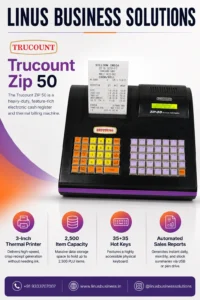
Trucount ZIP 50 electronic cash register and billing machine
NGX, Trucount

Trucount ZIP 50 Billing Machine

Trucount ZIP 50 Billing Machine: Features, Benefits & Uses Contact Now Know More Efficient billing is essential for retail businesses handling multiple products and customer transactions every day. The Trucount ZIP 50 Billing Machine is a heavy-duty electronic cash register and thermal billing machine designed to support everyday retail billing operations. With a 3-inch thermal printer, capacity for up to 2,500 PLU items, 35+35 hot keys, and automated sales reporting through USB or a pen drive, the Trucount ZIP 50 provides businesses with a dedicated billing solution for managing transactions and sales information efficiently. What Is the Trucount ZIP 50 Billing Machine? The Trucount ZIP 50 Billing Machine is a computerized electronic cash register designed for businesses that require dedicated billing and receipt-printing functionality. The machine combines a physical billing keyboard with an integrated thermal printer, allowing operators to enter transactions and generate customer receipts from a single system. Its large item capacity and dedicated hot keys make it particularly useful for retail businesses that manage a wide range of products and frequently process customer transactions. Key Features of the Trucount ZIP 50 3-Inch Thermal Printer The Trucount ZIP 50 features a 3-inch thermal printer designed for receipt generation. Thermal printing provides crisp printed receipts without requiring traditional ink cartridges for standard thermal printing. This can make everyday receipt generation convenient for busy retail counters. A 3-inch receipt format also provides more printable space than smaller receipt formats, allowing businesses to include relevant transaction details on their bills. 2,500-Item Capacity One of the major advantages of the Trucount ZIP 50 Billing Machine is its capacity to store up to 2,500 PLU items, according to the product information provided. PLU, or Price Look-Up, functionality allows businesses to store product information so that frequently sold items can be accessed during billing. A large item capacity is especially useful for retailers with extensive product catalogues. 35+35 Hot Keys The ZIP 50 features 35+35 hot keys, providing a highly accessible physical keyboard for billing operations. Dedicated hot keys can help operators access frequently used functions or products more quickly, reducing the need for repetitive manual entry. For busy billing counters, an organized physical keyboard can make daily transaction processing more convenient. Automated Sales Reports The Trucount ZIP 50 can generate sales reports for different reporting requirements. The product information highlights support for daily, monthly, and stock summaries, with reports transferable through USB or a pen drive. This can help businesses review sales information and move relevant data to another computer or storage device for further analysis or record keeping. Benefits of Using the Trucount ZIP 50 Efficient Retail Billing A dedicated electronic cash register provides a purpose-built environment for processing customer transactions. The ZIP 50 combines its physical keyboard, stored PLU items, and thermal printer to create a straightforward billing workflow. Manage a Large Product Catalogue Businesses selling a large number of products need sufficient item storage within their billing system. With capacity for up to 2,500 PLU items, the ZIP 50 can accommodate a substantial product catalogue and make stored products easier to access during billing. Faster Product Selection The 35+35 hot-key configuration can help operators access commonly used functions and products quickly. This can be particularly useful during busy periods when cashiers need to process multiple transactions efficiently. Simplified Sales Reporting Automated sales reports provide businesses with useful information about their billing activity. The ability to generate daily, monthly, and stock summaries can help business owners review sales performance and maintain operational records. Easy Data Transfer USB and pen-drive support for report transfer provides a convenient way to move billing information from the machine to another device. This can be useful when businesses need to maintain records or analyze sales information separately. Who Can Use the Trucount ZIP 50? The Trucount ZIP 50 Billing Machine can be suitable for different types of retail and commercial businesses. Retail Stores General retail stores can use the ZIP 50 for product billing, receipt printing, and sales reporting. Supermarkets Businesses with a large number of products can benefit from the machine’s 2,500-item PLU capacity. Grocery Stores Grocery and provision stores can use stored product information and dedicated hot keys to simplify repetitive billing operations. Pharmacies Pharmacies can use a suitable electronic cash register for billing and receipt generation, depending on their specific software and operational requirements. Wholesale and Commercial Businesses Businesses handling a broad product catalogue can benefit from the ZIP 50’s item storage and reporting capabilities. What Is PLU Capacity and Why Does It Matter? PLU stands for Price Look-Up. It is a feature that allows product information to be stored in a billing system. For example, instead of manually entering a product’s information every time a customer purchases it, the operator can access the stored PLU during billing. The Trucount ZIP 50 Billing Machine supports up to 2,500 PLU items, making it suitable for businesses that need to manage a relatively large product catalogue through their billing machine. The actual information stored for each item can depend on the machine’s configuration and available functionality. How Sales Reports Help Retail Businesses Sales reports are important for understanding day-to-day business performance. The ZIP 50 supports automated reporting that can provide information such as: Daily sales summaries Monthly sales summaries Stock summaries Other available billing information These reports can help business owners review transaction activity and maintain records. The ability to transfer reports through USB or a pen drive also makes it easier to move data from the billing machine to another system for further review. Trucount ZIP 50 vs. Basic Billing Machines A basic billing machine may be sufficient for businesses with a small product range and straightforward transaction requirements. However, businesses managing more products may benefit from features such as larger PLU capacity, dedicated hot keys, and sales reporting. The Trucount ZIP 50 Billing Machine combines these features with a 3-inch thermal printer, making it a more comprehensive option for businesses that need more than basic receipt generation. The right billing machine ultimately depends

Trucount

Trucount T-90 Billing Machine

Trucount T-90 Billing Machine: Features, Benefits & Uses Contact Now Know More Fast and reliable billing is essential for businesses handling a high volume of customer transactions. The Trucount T-90 Billing Machine is a heavy-duty computerized electronic billing machine and cash register designed for retail and hospitality businesses that need efficient billing and receipt printing. With high-speed 3-inch thermal printing, GST billing capabilities, optional battery backup, and large PLU storage, the Trucount T-90 provides a practical billing solution for businesses looking to improve their everyday checkout operations. What Is the Trucount T-90 Billing Machine? The Trucount T-90 Billing Machine is a computerized electronic billing machine and cash register designed for high-volume retail and hospitality environments. It combines billing functionality with an integrated thermal printer, allowing businesses to process transactions and generate receipts through a dedicated billing workstation. The T-90 is particularly suited to businesses that require fast transaction processing, GST-ready billing, extensive item storage, and reliable receipt printing. Key Features of the Trucount T-90 High-Speed 3-Inch Thermal Printer One of the major highlights of the Trucount T-90 is its high-speed 3-inch thermal printer. The printer provides a stated printing speed of 150 mm/sec, allowing receipts to be generated quickly during busy billing periods. Fast receipt printing can be particularly useful for retail stores and other businesses where multiple transactions are processed continuously throughout the day. Smart GST Billing The T-90 supports GST billing, including automatic tax calculation and receipt generation according to the configured billing setup. GST-ready billing can help businesses simplify routine tax-related calculations during customer transactions. Businesses should configure GST rates and tax settings according to their applicable requirements. Optional Battery Backup The Trucount T-90 Billing Machine supports an optional battery backup feature. Battery backup can help businesses continue billing during power interruptions, reducing potential disruption to customer transactions. This can be especially useful for businesses operating in areas where occasional power outages may affect normal checkout operations. Large PLU Capacity The T-90 provides large PLU capacity, allowing businesses to store and manage information for a substantial number of products or items. A larger product database can be useful for retail businesses with extensive product ranges. Instead of manually entering product information repeatedly, stored PLUs can help make product selection and billing more efficient. Benefits of Using the Trucount T-90 Faster Customer Checkout Fast thermal printing and an efficient computerized billing system can help businesses process transactions more quickly. This can be particularly important during peak hours when long checkout queues can affect customer experience. Efficient Receipt Generation The integrated 3-inch thermal printer provides fast receipt printing without requiring a separate receipt printer. This creates a more streamlined billing counter and keeps the essential billing hardware together in one system. Simplified GST Billing GST functionality can help businesses manage tax calculations as part of their regular billing process. This reduces the need for manual calculations and can make transaction processing more consistent. Reduced Downtime During Power Interruptions With the optional battery backup, businesses can have an additional layer of operational continuity during power interruptions. For high-volume retail environments, maintaining billing availability can help reduce disruption. Support for Large Product Catalogues The large PLU capacity makes the T-90 suitable for businesses handling many products. This can be useful for supermarkets, retail stores, and other businesses where maintaining a large item database is part of everyday billing. Who Can Use the Trucount T-90? The Trucount T-90 Billing Machine can be suitable for several types of businesses. Retail Stores Retail stores can use the T-90 for product billing, GST transactions, and fast receipt printing. Supermarkets Businesses with large product catalogues can benefit from the T-90’s PLU storage and fast thermal printing. Grocery Stores Grocery businesses can use a computerized billing system to manage daily customer transactions and receipts. Hospitality Businesses The T-90 can also be considered for hospitality businesses requiring a dedicated billing and receipt-printing system. High-Volume Billing Counters Businesses processing a large number of transactions can benefit from fast receipt printing and a dedicated electronic billing workstation. Trucount T-90 vs. Basic Billing Machines Basic billing machines may provide essential transaction and receipt-printing functions, but businesses with higher transaction volumes may require additional capabilities. The Trucount T-90 adds features such as high-speed 3-inch thermal printing, GST billing, optional battery backup, and large PLU storage. These features make it more suitable for businesses that need a billing system capable of handling a larger product catalogue and frequent customer transactions. The right choice will ultimately depend on the business’s product range, transaction volume, reporting requirements, and preferred billing workflow. Why Is Fast Thermal Printing Important? Receipt printing speed may seem like a small detail, but it can have a noticeable impact on busy billing counters. With a stated speed of 150 mm/sec, the T-90 is designed to generate receipts quickly. Faster printing can help reduce waiting time between completed transactions and allow cashiers to move on to the next customer sooner. For businesses with high transaction volumes, this can contribute to a smoother checkout process. What Is PLU Storage and Why Does It Matter? PLU stands for Price Look-Up. PLU functionality allows businesses to store product information within a billing system so that products can be selected during transactions without repeatedly entering all their details. For businesses with hundreds or thousands of products, a large PLU capacity can make daily billing more manageable. The Trucount T-90 Billing Machine is designed with large PLU storage, making it a useful option for businesses with extensive product inventories. What Should You Consider Before Buying a Billing Machine? Before purchasing a billing machine, businesses should evaluate their actual operational requirements. Consider: Number of daily transactions Product catalogue size Required PLU capacity Receipt paper size Printing speed GST billing requirements Battery backup requirements Cash drawer compatibility Barcode scanner requirements After-sales service and support Choosing a billing machine based on these factors helps ensure that the equipment matches the actual business workflow. Why Choose the Trucount T-90 Billing Machine? The Trucount T-90 Billing Machine combines high-speed thermal receipt

Touch POS

iMin Android POS System

iMin Android POS System: Features, Benefits & Uses Contact Now Know More Businesses today need more than a traditional billing machine to manage fast-moving sales and customer transactions. The iMin Android POS System combines commercial-grade hardware with the flexibility of the Android operating system, giving businesses a modern platform for billing, payments, inventory, customer management, and other business applications. Designed for modern retail, food and beverage, and logistics environments, iMin Android POS systems can support a wide range of third-party applications. Their combination of integrated hardware, touchscreen interfaces, printing capabilities, scanning options, and wireless connectivity makes them suitable for businesses looking to modernize their point-of-sale setup. What Is an iMin Android POS System? An iMin Android POS System is a commercial point-of-sale terminal built around the Android operating system. Unlike conventional desktop-based POS systems, Android POS terminals combine touchscreen hardware with a flexible operating environment that can support compatible applications. iMin focuses primarily on commercial POS hardware, allowing businesses to select and run suitable third-party applications based on their specific requirements. This makes an iMin POS solution useful for businesses that want flexibility when selecting billing, retail management, restaurant, payment, inventory, or other compatible applications. Key Features of iMin Android POS Systems Android-Based POS Platform The Android operating system provides businesses with a familiar and flexible environment for compatible POS applications. Businesses can choose applications according to their workflow instead of being restricted to a single software ecosystem. This can be particularly useful for retailers and F&B businesses that have specific billing or management requirements. Integrated Thermal Printing Selected iMin POS systems feature built-in high-speed thermal printers, reducing the need for a separate receipt printer at the billing counter. Integrated printing can help create a cleaner workspace while reducing the number of external peripherals required for everyday receipt printing. For businesses handling frequent transactions, having printing directly within the POS terminal can also simplify the checkout process. Dual Display Options Some iMin Android POS configurations provide dual-display options, including customer-facing secondary screens. A customer-facing display can improve transparency during checkout by allowing customers to view relevant transaction information while the cashier processes the order. This can be useful for retail stores, restaurants, and other customer-facing businesses. Advanced Barcode and QR Scanning iMin POS systems can include built-in cameras and modular scanners designed to read 1D barcodes and 2D QR codes. Barcode scanning can speed up product selection during checkout, while QR-code scanning can support compatible business and payment workflows. The exact scanning capabilities depend on the iMin model and configuration. Robust Wireless Connectivity Modern POS terminals need reliable connectivity for applications, cloud services, peripherals, and business networks. The featured iMin systems support connectivity options including: 4G LTE Wi-Fi 6 Bluetooth 5.4 These connectivity options provide businesses with greater flexibility when deploying POS terminals across different working environments. Benefits of Using an iMin Android POS System Faster Checkout A touchscreen interface combined with integrated printing and barcode scanning can help businesses streamline the checkout process. Employees can access compatible billing applications, scan products, process transactions, and print receipts through a consolidated POS setup. Reduced Peripheral Clutter An iMin Android POS Machine can integrate multiple functions into one commercial terminal. Depending on the model, businesses may be able to reduce their reliance on separate equipment such as receipt printers and barcode scanners. This can create a cleaner and more organized billing counter. Flexible Software Selection One of the major advantages of Android-based POS hardware is application flexibility. Businesses can select compatible third-party software based on their industry and operational requirements. This can be particularly useful when different businesses need different billing, inventory, restaurant, or payment applications. Better Customer Interaction Dual-display configurations can provide a customer-facing screen where customers can view transaction information during checkout. This can create a more transparent and professional checkout experience. Wireless Deployment With options such as Wi-Fi, Bluetooth, and 4G LTE on supported configurations, iMin terminals can provide flexible connectivity for different business environments. This can be useful for businesses where wired connectivity is not always convenient or where mobile connectivity is required. Where Can iMin Android POS Systems Be Used? The iMin Android POS System can be used across several industries. Retail Stores Retail businesses can use Android POS terminals for billing, barcode scanning, inventory management, and customer transactions through compatible software. Supermarkets Supermarkets can benefit from touchscreen billing, barcode scanning, receipt printing, and connectivity with other compatible POS equipment. Restaurants and Cafés Restaurants and cafés can use Android POS systems with compatible restaurant management applications for order processing, billing, and customer service. Food & Beverage Businesses F&B businesses can benefit from compact POS hardware with integrated printing and flexible application support. Logistics Logistics businesses can use compatible Android applications for transactions, scanning, inventory-related workflows, and operational management. Mobile and Flexible Workspaces Depending on the model, wireless connectivity can make iMin POS hardware suitable for businesses that require greater flexibility in their POS deployment. iMin Android POS System vs Traditional POS Traditional POS systems often rely on a desktop computer, separate monitor, external receipt printer, and additional peripherals. An iMin Android POS System can consolidate several of these functions into a commercial-grade terminal. The result can be a cleaner installation with fewer separate components. Android also provides application flexibility that can be useful for businesses that want to choose software based on their specific workflow. However, the right POS system depends on factors such as software compatibility, transaction volume, peripheral requirements, connectivity, and business size. What Should You Consider Before Buying an Android POS Machine? Before purchasing an Android POS terminal, businesses should evaluate the complete system rather than focusing only on the display or processor. Consider: POS software compatibility Screen size and configuration Integrated printer requirements Barcode and QR scanning requirements Customer display requirements Internet connectivity 4G requirements Wi-Fi requirements Bluetooth peripheral support Storage and performance requirements After-sales service and technical support The exact hardware capabilities can vary between iMin models, so businesses should confirm the specifications of the selected model before purchase. Why Choose

Scroll to Top