

iMin Android POS System: Features, Benefits & Uses
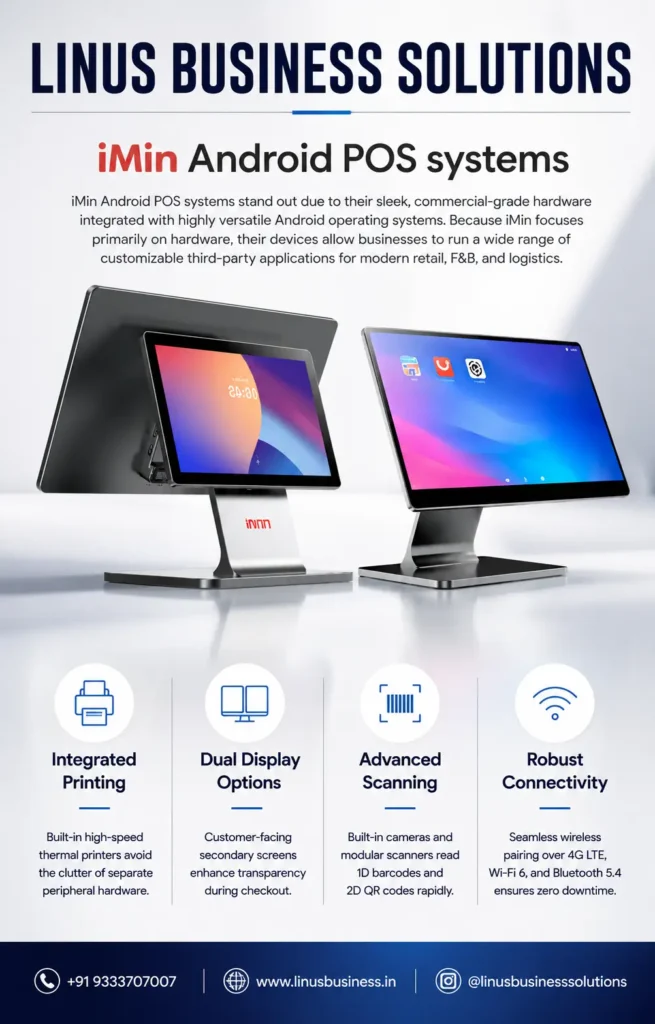
Businesses today need more than a traditional billing machine to manage fast-moving sales and customer transactions. The iMin Android POS System combines commercial-grade hardware with the flexibility of the Android operating system, giving businesses a modern platform for billing, payments, inventory, customer management, and other business applications.
Designed for modern retail, food and beverage, and logistics environments, iMin Android POS systems can support a wide range of third-party applications. Their combination of integrated hardware, touchscreen interfaces, printing capabilities, scanning options, and wireless connectivity makes them suitable for businesses looking to modernize their point-of-sale setup.
What Is an iMin Android POS System?
An iMin Android POS System is a commercial point-of-sale terminal built around the Android operating system. Unlike conventional desktop-based POS systems, Android POS terminals combine touchscreen hardware with a flexible operating environment that can support compatible applications.
iMin focuses primarily on commercial POS hardware, allowing businesses to select and run suitable third-party applications based on their specific requirements.
This makes an iMin POS solution useful for businesses that want flexibility when selecting billing, retail management, restaurant, payment, inventory, or other compatible applications.
Key Features of iMin Android POS Systems
Android-Based POS Platform
The Android operating system provides businesses with a familiar and flexible environment for compatible POS applications.
Businesses can choose applications according to their workflow instead of being restricted to a single software ecosystem. This can be particularly useful for retailers and F&B businesses that have specific billing or management requirements.
Integrated Thermal Printing
Selected iMin POS systems feature built-in high-speed thermal printers, reducing the need for a separate receipt printer at the billing counter.
Integrated printing can help create a cleaner workspace while reducing the number of external peripherals required for everyday receipt printing.
For businesses handling frequent transactions, having printing directly within the POS terminal can also simplify the checkout process.
Dual Display Options
Some iMin Android POS configurations provide dual-display options, including customer-facing secondary screens.
A customer-facing display can improve transparency during checkout by allowing customers to view relevant transaction information while the cashier processes the order.
This can be useful for retail stores, restaurants, and other customer-facing businesses.
Advanced Barcode and QR Scanning
iMin POS systems can include built-in cameras and modular scanners designed to read 1D barcodes and 2D QR codes.
Barcode scanning can speed up product selection during checkout, while QR-code scanning can support compatible business and payment workflows.
The exact scanning capabilities depend on the iMin model and configuration.
Robust Wireless Connectivity
Modern POS terminals need reliable connectivity for applications, cloud services, peripherals, and business networks.
The featured iMin systems support connectivity options including:
- 4G LTE
- Wi-Fi 6
- Bluetooth 5.4
These connectivity options provide businesses with greater flexibility when deploying POS terminals across different working environments.
Benefits of Using an iMin Android POS System
Faster Checkout
A touchscreen interface combined with integrated printing and barcode scanning can help businesses streamline the checkout process.
Employees can access compatible billing applications, scan products, process transactions, and print receipts through a consolidated POS setup.
Reduced Peripheral Clutter
An iMin Android POS Machine can integrate multiple functions into one commercial terminal.
Depending on the model, businesses may be able to reduce their reliance on separate equipment such as receipt printers and barcode scanners.
This can create a cleaner and more organized billing counter.
Flexible Software Selection
One of the major advantages of Android-based POS hardware is application flexibility.
Businesses can select compatible third-party software based on their industry and operational requirements. This can be particularly useful when different businesses need different billing, inventory, restaurant, or payment applications.
Better Customer Interaction
Dual-display configurations can provide a customer-facing screen where customers can view transaction information during checkout.
This can create a more transparent and professional checkout experience.
Wireless Deployment
With options such as Wi-Fi, Bluetooth, and 4G LTE on supported configurations, iMin terminals can provide flexible connectivity for different business environments.
This can be useful for businesses where wired connectivity is not always convenient or where mobile connectivity is required.
Where Can iMin Android POS Systems Be Used?
The iMin Android POS System can be used across several industries.
Retail Stores
Retail businesses can use Android POS terminals for billing, barcode scanning, inventory management, and customer transactions through compatible software.
Supermarkets
Supermarkets can benefit from touchscreen billing, barcode scanning, receipt printing, and connectivity with other compatible POS equipment.
Restaurants and Cafés
Restaurants and cafés can use Android POS systems with compatible restaurant management applications for order processing, billing, and customer service.
Food & Beverage Businesses
F&B businesses can benefit from compact POS hardware with integrated printing and flexible application support.
Logistics
Logistics businesses can use compatible Android applications for transactions, scanning, inventory-related workflows, and operational management.
Mobile and Flexible Workspaces
Depending on the model, wireless connectivity can make iMin POS hardware suitable for businesses that require greater flexibility in their POS deployment.
iMin Android POS System vs Traditional POS
Traditional POS systems often rely on a desktop computer, separate monitor, external receipt printer, and additional peripherals.
An iMin Android POS System can consolidate several of these functions into a commercial-grade terminal.
The result can be a cleaner installation with fewer separate components. Android also provides application flexibility that can be useful for businesses that want to choose software based on their specific workflow.
However, the right POS system depends on factors such as software compatibility, transaction volume, peripheral requirements, connectivity, and business size.
What Should You Consider Before Buying an Android POS Machine?
Before purchasing an Android POS terminal, businesses should evaluate the complete system rather than focusing only on the display or processor.
Consider:
- POS software compatibility
- Screen size and configuration
- Integrated printer requirements
- Barcode and QR scanning requirements
- Customer display requirements
- Internet connectivity
- 4G requirements
- Wi-Fi requirements
- Bluetooth peripheral support
- Storage and performance requirements
- After-sales service and technical support
The exact hardware capabilities can vary between iMin models, so businesses should confirm the specifications of the selected model before purchase.
Why Choose iMin Android POS Systems?
iMin Android POS systems combine commercial-grade hardware with the flexibility of Android applications. Integrated printing, optional dual displays, scanning capabilities, and modern wireless connectivity can help businesses build a more efficient and organized POS environment.
For retailers, restaurants, F&B businesses, and logistics operations looking for flexible Android-based POS hardware, iMin is a strong option to consider.
The most important factor is selecting the right iMin model and compatible software according to the business’s actual workflow.
Get iMin Android POS Systems in Hyderabad
Looking for an iMin Android POS System in Hyderabad?
Linus Business Solutions provides Android POS solutions for retail, restaurants, F&B businesses, logistics, and other commercial applications. Our team can help you understand the available iMin POS models, compatible software, peripherals, and connectivity options.
Whether you need an Android billing terminal, integrated receipt printing, barcode scanning, or a complete POS setup, we can help you choose a solution based on your business requirements.
Contact Linus Business Solutions to enquire about iMin Android POS Systems and find the right POS solution for your business.