
linusbusiness.in

Author name: linusbusinesses@gmail.com

Trucount

Trucount T20 Billing Machine

Trucount T20 Billing Machine: Features, Benefits & Uses Contact Now Know More Efficient billing is important for businesses that handle regular customer transactions throughout the day. The Trucount T20 Billing Machine is a semi-automatic electronic cash register designed for small retail outlets, bakeries, sweet shops, and restaurants that need a compact and practical solution for billing and inventory-related operations. With an integrated 2-inch thermal printer, USB connectivity, large PLU storage, daily sales reporting, and support for KOT or table billing modes, the Trucount T20 can help businesses simplify everyday billing while keeping the checkout counter organized. What Is the Trucount T20 Billing Machine? The Trucount T20 Billing Machine is a semi-automatic electronic cash register and billing machine designed for small and medium-sized business environments. It combines a dedicated alphanumeric keypad, operator display, built-in thermal printer, and data-management capabilities in a compact countertop design. The system is particularly suited to businesses that need straightforward billing functionality without setting up a larger computer-based POS workstation. Key Features of the Trucount T20 Built-In 2-Inch Thermal Printer The Trucount T20 includes an integrated 2-inch thermal printer for generating customer receipts. Having the printer built directly into the billing machine reduces the need for a separate receipt printer and helps maintain a clean, organized countertop. Thermal printing is also convenient for regular receipt generation because standard thermal printing does not require conventional ink cartridges. USB Connectivity The T20 supports USB flash drives, allowing businesses to upload and download relevant data. USB connectivity can be useful for transferring information between the billing machine and external storage devices without requiring a complicated network setup. The product also supports daily sales report generation, making data transfer useful for businesses that need to review or maintain sales records. Daily Sales Reports Sales reporting is an important part of managing a retail business. The Trucount T20 Billing Machine supports daily sales report generation, allowing business owners or operators to review transaction information and maintain records. Regular sales reports can help businesses understand daily billing activity and monitor their operations more effectively. Large Item and PLU Storage The T20 can store hundreds of product PLUs, according to the product information provided. PLU, or Price Look-Up, storage allows product information to be stored in the billing machine so that frequently sold products can be accessed quickly during transactions. This is useful for businesses that handle multiple products and want to reduce repetitive manual data entry. KOT and Table Billing Modes The Trucount T20 supports restaurant-oriented billing modes such as KOT and table billing. KOT, or Kitchen Order Ticket, functionality can be useful in restaurant environments where customer orders need to be communicated to the kitchen as part of the billing workflow. Table billing support can also help restaurants organize transactions according to different tables or customer orders. Compact Countertop Design Counter space is valuable in small retail outlets, bakeries, restaurants, and other businesses. The T20 features a compact countertop structure designed to provide billing functionality without requiring a large workstation. Its integrated printer and dedicated keypad contribute to a relatively self-contained billing setup. Alphanumeric Keypad The T20 features an alphanumeric keypad for entering billing information and accessing different functions. A physical keypad can be useful for operators who perform repetitive billing tasks throughout the day and prefer dedicated keys over a touchscreen-only interface. Benefits of Using the Trucount T20 Simplifies Everyday Billing The Trucount T20 Billing Machine brings core billing functions together in one dedicated system. Businesses can enter transactions, generate receipts, store product information, and access sales reports through the billing machine. Saves Counter Space Because the thermal printer is integrated into the unit, businesses do not need to allocate additional counter space for a separate receipt printer. This can be particularly useful for small shops and compact billing counters. Supports Product-Based Billing PLU storage allows businesses to maintain product information within the billing system. For stores selling hundreds of products, stored PLUs can make product selection faster and reduce repeated manual entry. Useful for Restaurant Billing The availability of KOT and table billing modes makes the T20 relevant to restaurants and food-service businesses. A restaurant can use these features as part of its order and billing workflow, depending on its operational requirements. Convenient Data Transfer USB support provides a straightforward way to upload and download data using a compatible flash drive. This can be useful for transferring sales information and maintaining business records. Who Can Use the Trucount T20? The Trucount T20 Billing Machine is particularly suited to small and medium-sized businesses. Small Retail Stores Retail stores can use the T20 for everyday product billing, receipt printing, and sales reporting. Bakeries Bakeries can benefit from quick billing and stored product information while keeping the billing counter compact. Sweet Shops Sweet shops handling multiple products and frequent customer transactions can use PLU-based billing to simplify product selection. Restaurants The KOT and table billing capabilities make the T20 suitable for restaurant environments where order management and billing need to work together. Provision and Grocery Stores Stores with a relatively large number of products can use PLU storage to simplify recurring billing transactions. What Is PLU Storage? PLU stands for Price Look-Up. A PLU system allows products and their relevant pricing information to be stored in the billing machine. Instead of entering product details manually for every transaction, the operator can select the relevant stored item. For businesses selling hundreds of products, PLU storage can significantly simplify repetitive billing operations. The Trucount T20 Billing Machine supports storage for hundreds of product PLUs, making it suitable for businesses with a moderate-sized product catalogue. How KOT and Table Billing Help Restaurants Restaurants have different billing requirements from conventional retail stores. A restaurant may need to associate orders with tables, send order information through a KOT workflow, and generate a final bill after the customer’s meal. The Trucount T20 supports KOT and table billing modes, making it a potential fit for smaller restaurants and food-service businesses that require these functions. The exact workflow will depend
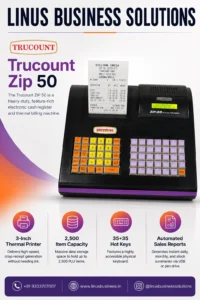
Trucount ZIP 50 electronic cash register and billing machine
NGX, Trucount

Trucount ZIP 50 Billing Machine

Trucount ZIP 50 Billing Machine: Features, Benefits & Uses Contact Now Know More Efficient billing is essential for retail businesses handling multiple products and customer transactions every day. The Trucount ZIP 50 Billing Machine is a heavy-duty electronic cash register and thermal billing machine designed to support everyday retail billing operations. With a 3-inch thermal printer, capacity for up to 2,500 PLU items, 35+35 hot keys, and automated sales reporting through USB or a pen drive, the Trucount ZIP 50 provides businesses with a dedicated billing solution for managing transactions and sales information efficiently. What Is the Trucount ZIP 50 Billing Machine? The Trucount ZIP 50 Billing Machine is a computerized electronic cash register designed for businesses that require dedicated billing and receipt-printing functionality. The machine combines a physical billing keyboard with an integrated thermal printer, allowing operators to enter transactions and generate customer receipts from a single system. Its large item capacity and dedicated hot keys make it particularly useful for retail businesses that manage a wide range of products and frequently process customer transactions. Key Features of the Trucount ZIP 50 3-Inch Thermal Printer The Trucount ZIP 50 features a 3-inch thermal printer designed for receipt generation. Thermal printing provides crisp printed receipts without requiring traditional ink cartridges for standard thermal printing. This can make everyday receipt generation convenient for busy retail counters. A 3-inch receipt format also provides more printable space than smaller receipt formats, allowing businesses to include relevant transaction details on their bills. 2,500-Item Capacity One of the major advantages of the Trucount ZIP 50 Billing Machine is its capacity to store up to 2,500 PLU items, according to the product information provided. PLU, or Price Look-Up, functionality allows businesses to store product information so that frequently sold items can be accessed during billing. A large item capacity is especially useful for retailers with extensive product catalogues. 35+35 Hot Keys The ZIP 50 features 35+35 hot keys, providing a highly accessible physical keyboard for billing operations. Dedicated hot keys can help operators access frequently used functions or products more quickly, reducing the need for repetitive manual entry. For busy billing counters, an organized physical keyboard can make daily transaction processing more convenient. Automated Sales Reports The Trucount ZIP 50 can generate sales reports for different reporting requirements. The product information highlights support for daily, monthly, and stock summaries, with reports transferable through USB or a pen drive. This can help businesses review sales information and move relevant data to another computer or storage device for further analysis or record keeping. Benefits of Using the Trucount ZIP 50 Efficient Retail Billing A dedicated electronic cash register provides a purpose-built environment for processing customer transactions. The ZIP 50 combines its physical keyboard, stored PLU items, and thermal printer to create a straightforward billing workflow. Manage a Large Product Catalogue Businesses selling a large number of products need sufficient item storage within their billing system. With capacity for up to 2,500 PLU items, the ZIP 50 can accommodate a substantial product catalogue and make stored products easier to access during billing. Faster Product Selection The 35+35 hot-key configuration can help operators access commonly used functions and products quickly. This can be particularly useful during busy periods when cashiers need to process multiple transactions efficiently. Simplified Sales Reporting Automated sales reports provide businesses with useful information about their billing activity. The ability to generate daily, monthly, and stock summaries can help business owners review sales performance and maintain operational records. Easy Data Transfer USB and pen-drive support for report transfer provides a convenient way to move billing information from the machine to another device. This can be useful when businesses need to maintain records or analyze sales information separately. Who Can Use the Trucount ZIP 50? The Trucount ZIP 50 Billing Machine can be suitable for different types of retail and commercial businesses. Retail Stores General retail stores can use the ZIP 50 for product billing, receipt printing, and sales reporting. Supermarkets Businesses with a large number of products can benefit from the machine’s 2,500-item PLU capacity. Grocery Stores Grocery and provision stores can use stored product information and dedicated hot keys to simplify repetitive billing operations. Pharmacies Pharmacies can use a suitable electronic cash register for billing and receipt generation, depending on their specific software and operational requirements. Wholesale and Commercial Businesses Businesses handling a broad product catalogue can benefit from the ZIP 50’s item storage and reporting capabilities. What Is PLU Capacity and Why Does It Matter? PLU stands for Price Look-Up. It is a feature that allows product information to be stored in a billing system. For example, instead of manually entering a product’s information every time a customer purchases it, the operator can access the stored PLU during billing. The Trucount ZIP 50 Billing Machine supports up to 2,500 PLU items, making it suitable for businesses that need to manage a relatively large product catalogue through their billing machine. The actual information stored for each item can depend on the machine’s configuration and available functionality. How Sales Reports Help Retail Businesses Sales reports are important for understanding day-to-day business performance. The ZIP 50 supports automated reporting that can provide information such as: Daily sales summaries Monthly sales summaries Stock summaries Other available billing information These reports can help business owners review transaction activity and maintain records. The ability to transfer reports through USB or a pen drive also makes it easier to move data from the billing machine to another system for further review. Trucount ZIP 50 vs. Basic Billing Machines A basic billing machine may be sufficient for businesses with a small product range and straightforward transaction requirements. However, businesses managing more products may benefit from features such as larger PLU capacity, dedicated hot keys, and sales reporting. The Trucount ZIP 50 Billing Machine combines these features with a 3-inch thermal printer, making it a more comprehensive option for businesses that need more than basic receipt generation. The right billing machine ultimately depends

Trucount

Trucount T-90 Billing Machine

Trucount T-90 Billing Machine: Features, Benefits & Uses Contact Now Know More Fast and reliable billing is essential for businesses handling a high volume of customer transactions. The Trucount T-90 Billing Machine is a heavy-duty computerized electronic billing machine and cash register designed for retail and hospitality businesses that need efficient billing and receipt printing. With high-speed 3-inch thermal printing, GST billing capabilities, optional battery backup, and large PLU storage, the Trucount T-90 provides a practical billing solution for businesses looking to improve their everyday checkout operations. What Is the Trucount T-90 Billing Machine? The Trucount T-90 Billing Machine is a computerized electronic billing machine and cash register designed for high-volume retail and hospitality environments. It combines billing functionality with an integrated thermal printer, allowing businesses to process transactions and generate receipts through a dedicated billing workstation. The T-90 is particularly suited to businesses that require fast transaction processing, GST-ready billing, extensive item storage, and reliable receipt printing. Key Features of the Trucount T-90 High-Speed 3-Inch Thermal Printer One of the major highlights of the Trucount T-90 is its high-speed 3-inch thermal printer. The printer provides a stated printing speed of 150 mm/sec, allowing receipts to be generated quickly during busy billing periods. Fast receipt printing can be particularly useful for retail stores and other businesses where multiple transactions are processed continuously throughout the day. Smart GST Billing The T-90 supports GST billing, including automatic tax calculation and receipt generation according to the configured billing setup. GST-ready billing can help businesses simplify routine tax-related calculations during customer transactions. Businesses should configure GST rates and tax settings according to their applicable requirements. Optional Battery Backup The Trucount T-90 Billing Machine supports an optional battery backup feature. Battery backup can help businesses continue billing during power interruptions, reducing potential disruption to customer transactions. This can be especially useful for businesses operating in areas where occasional power outages may affect normal checkout operations. Large PLU Capacity The T-90 provides large PLU capacity, allowing businesses to store and manage information for a substantial number of products or items. A larger product database can be useful for retail businesses with extensive product ranges. Instead of manually entering product information repeatedly, stored PLUs can help make product selection and billing more efficient. Benefits of Using the Trucount T-90 Faster Customer Checkout Fast thermal printing and an efficient computerized billing system can help businesses process transactions more quickly. This can be particularly important during peak hours when long checkout queues can affect customer experience. Efficient Receipt Generation The integrated 3-inch thermal printer provides fast receipt printing without requiring a separate receipt printer. This creates a more streamlined billing counter and keeps the essential billing hardware together in one system. Simplified GST Billing GST functionality can help businesses manage tax calculations as part of their regular billing process. This reduces the need for manual calculations and can make transaction processing more consistent. Reduced Downtime During Power Interruptions With the optional battery backup, businesses can have an additional layer of operational continuity during power interruptions. For high-volume retail environments, maintaining billing availability can help reduce disruption. Support for Large Product Catalogues The large PLU capacity makes the T-90 suitable for businesses handling many products. This can be useful for supermarkets, retail stores, and other businesses where maintaining a large item database is part of everyday billing. Who Can Use the Trucount T-90? The Trucount T-90 Billing Machine can be suitable for several types of businesses. Retail Stores Retail stores can use the T-90 for product billing, GST transactions, and fast receipt printing. Supermarkets Businesses with large product catalogues can benefit from the T-90’s PLU storage and fast thermal printing. Grocery Stores Grocery businesses can use a computerized billing system to manage daily customer transactions and receipts. Hospitality Businesses The T-90 can also be considered for hospitality businesses requiring a dedicated billing and receipt-printing system. High-Volume Billing Counters Businesses processing a large number of transactions can benefit from fast receipt printing and a dedicated electronic billing workstation. Trucount T-90 vs. Basic Billing Machines Basic billing machines may provide essential transaction and receipt-printing functions, but businesses with higher transaction volumes may require additional capabilities. The Trucount T-90 adds features such as high-speed 3-inch thermal printing, GST billing, optional battery backup, and large PLU storage. These features make it more suitable for businesses that need a billing system capable of handling a larger product catalogue and frequent customer transactions. The right choice will ultimately depend on the business’s product range, transaction volume, reporting requirements, and preferred billing workflow. Why Is Fast Thermal Printing Important? Receipt printing speed may seem like a small detail, but it can have a noticeable impact on busy billing counters. With a stated speed of 150 mm/sec, the T-90 is designed to generate receipts quickly. Faster printing can help reduce waiting time between completed transactions and allow cashiers to move on to the next customer sooner. For businesses with high transaction volumes, this can contribute to a smoother checkout process. What Is PLU Storage and Why Does It Matter? PLU stands for Price Look-Up. PLU functionality allows businesses to store product information within a billing system so that products can be selected during transactions without repeatedly entering all their details. For businesses with hundreds or thousands of products, a large PLU capacity can make daily billing more manageable. The Trucount T-90 Billing Machine is designed with large PLU storage, making it a useful option for businesses with extensive product inventories. What Should You Consider Before Buying a Billing Machine? Before purchasing a billing machine, businesses should evaluate their actual operational requirements. Consider: Number of daily transactions Product catalogue size Required PLU capacity Receipt paper size Printing speed GST billing requirements Battery backup requirements Cash drawer compatibility Barcode scanner requirements After-sales service and support Choosing a billing machine based on these factors helps ensure that the equipment matches the actual business workflow. Why Choose the Trucount T-90 Billing Machine? The Trucount T-90 Billing Machine combines high-speed thermal receipt

Touch POS

iMin Android POS System

iMin Android POS System: Features, Benefits & Uses Contact Now Know More Businesses today need more than a traditional billing machine to manage fast-moving sales and customer transactions. The iMin Android POS System combines commercial-grade hardware with the flexibility of the Android operating system, giving businesses a modern platform for billing, payments, inventory, customer management, and other business applications. Designed for modern retail, food and beverage, and logistics environments, iMin Android POS systems can support a wide range of third-party applications. Their combination of integrated hardware, touchscreen interfaces, printing capabilities, scanning options, and wireless connectivity makes them suitable for businesses looking to modernize their point-of-sale setup. What Is an iMin Android POS System? An iMin Android POS System is a commercial point-of-sale terminal built around the Android operating system. Unlike conventional desktop-based POS systems, Android POS terminals combine touchscreen hardware with a flexible operating environment that can support compatible applications. iMin focuses primarily on commercial POS hardware, allowing businesses to select and run suitable third-party applications based on their specific requirements. This makes an iMin POS solution useful for businesses that want flexibility when selecting billing, retail management, restaurant, payment, inventory, or other compatible applications. Key Features of iMin Android POS Systems Android-Based POS Platform The Android operating system provides businesses with a familiar and flexible environment for compatible POS applications. Businesses can choose applications according to their workflow instead of being restricted to a single software ecosystem. This can be particularly useful for retailers and F&B businesses that have specific billing or management requirements. Integrated Thermal Printing Selected iMin POS systems feature built-in high-speed thermal printers, reducing the need for a separate receipt printer at the billing counter. Integrated printing can help create a cleaner workspace while reducing the number of external peripherals required for everyday receipt printing. For businesses handling frequent transactions, having printing directly within the POS terminal can also simplify the checkout process. Dual Display Options Some iMin Android POS configurations provide dual-display options, including customer-facing secondary screens. A customer-facing display can improve transparency during checkout by allowing customers to view relevant transaction information while the cashier processes the order. This can be useful for retail stores, restaurants, and other customer-facing businesses. Advanced Barcode and QR Scanning iMin POS systems can include built-in cameras and modular scanners designed to read 1D barcodes and 2D QR codes. Barcode scanning can speed up product selection during checkout, while QR-code scanning can support compatible business and payment workflows. The exact scanning capabilities depend on the iMin model and configuration. Robust Wireless Connectivity Modern POS terminals need reliable connectivity for applications, cloud services, peripherals, and business networks. The featured iMin systems support connectivity options including: 4G LTE Wi-Fi 6 Bluetooth 5.4 These connectivity options provide businesses with greater flexibility when deploying POS terminals across different working environments. Benefits of Using an iMin Android POS System Faster Checkout A touchscreen interface combined with integrated printing and barcode scanning can help businesses streamline the checkout process. Employees can access compatible billing applications, scan products, process transactions, and print receipts through a consolidated POS setup. Reduced Peripheral Clutter An iMin Android POS Machine can integrate multiple functions into one commercial terminal. Depending on the model, businesses may be able to reduce their reliance on separate equipment such as receipt printers and barcode scanners. This can create a cleaner and more organized billing counter. Flexible Software Selection One of the major advantages of Android-based POS hardware is application flexibility. Businesses can select compatible third-party software based on their industry and operational requirements. This can be particularly useful when different businesses need different billing, inventory, restaurant, or payment applications. Better Customer Interaction Dual-display configurations can provide a customer-facing screen where customers can view transaction information during checkout. This can create a more transparent and professional checkout experience. Wireless Deployment With options such as Wi-Fi, Bluetooth, and 4G LTE on supported configurations, iMin terminals can provide flexible connectivity for different business environments. This can be useful for businesses where wired connectivity is not always convenient or where mobile connectivity is required. Where Can iMin Android POS Systems Be Used? The iMin Android POS System can be used across several industries. Retail Stores Retail businesses can use Android POS terminals for billing, barcode scanning, inventory management, and customer transactions through compatible software. Supermarkets Supermarkets can benefit from touchscreen billing, barcode scanning, receipt printing, and connectivity with other compatible POS equipment. Restaurants and Cafés Restaurants and cafés can use Android POS systems with compatible restaurant management applications for order processing, billing, and customer service. Food & Beverage Businesses F&B businesses can benefit from compact POS hardware with integrated printing and flexible application support. Logistics Logistics businesses can use compatible Android applications for transactions, scanning, inventory-related workflows, and operational management. Mobile and Flexible Workspaces Depending on the model, wireless connectivity can make iMin POS hardware suitable for businesses that require greater flexibility in their POS deployment. iMin Android POS System vs Traditional POS Traditional POS systems often rely on a desktop computer, separate monitor, external receipt printer, and additional peripherals. An iMin Android POS System can consolidate several of these functions into a commercial-grade terminal. The result can be a cleaner installation with fewer separate components. Android also provides application flexibility that can be useful for businesses that want to choose software based on their specific workflow. However, the right POS system depends on factors such as software compatibility, transaction volume, peripheral requirements, connectivity, and business size. What Should You Consider Before Buying an Android POS Machine? Before purchasing an Android POS terminal, businesses should evaluate the complete system rather than focusing only on the display or processor. Consider: POS software compatibility Screen size and configuration Integrated printer requirements Barcode and QR scanning requirements Customer display requirements Internet connectivity 4G requirements Wi-Fi requirements Bluetooth peripheral support Storage and performance requirements After-sales service and technical support The exact hardware capabilities can vary between iMin models, so businesses should confirm the specifications of the selected model before purchase. Why Choose

NGX Billing Machine

NGX Smart Pro Billing Machine

NGX Smart Pro Billing Machine: Features, Benefits & Uses Contact Now Know More Modern businesses need billing systems that are not only fast and reliable but also easy to manage and update. The NGX Smart Pro Billing Machine is designed to simplify everyday billing while adding modern features such as remote data management and over-the-air software updates. Developed by NGX Technologies, the Smart Pro combines a compact design with thermal printing, GST-ready billing, customizable receipt content, and expandable storage. These features make it a practical solution for retail stores and other businesses looking for a modern electronic billing machine. What Is the NGX Smart Pro Billing Machine? The NGX Smart Pro Billing Machine is a modern electronic billing solution designed to simplify business transactions and everyday billing operations. Its compact design makes it suitable for billing counters where space and ease of operation are important. The machine also supports both 2-inch and 3-inch thermal paper, giving businesses flexibility in choosing their receipt format. Unlike a basic billing machine, the Smart Pro also provides features for remote data management and over-the-air updates, making it easier to maintain the system without relying entirely on manual updates. Key Features of the NGX Smart Pro Remote Data Management One of the standout features of the NGX Smart Pro Billing Machine is remote data management. According to the product information, users can download and manage data through the NGX XPOS Lite Mobile App. This can make it more convenient for businesses to manage relevant billing data remotely. For business owners who want greater flexibility in managing their billing operations, remote data access can be a useful addition to a traditional billing machine. Over-the-Air Installation and Updates The Smart Pro supports Over-The-Air (OTA) installation and updates. This allows the latest software updates and security patches to be delivered remotely without requiring the same level of manual intervention associated with traditional update processes. OTA functionality can help businesses keep their billing system updated while reducing the effort required for routine software maintenance. GST-Ready Billing The NGX Smart Pro is designed with GST-ready billing capabilities, helping businesses manage billing in line with applicable tax requirements. For Indian retailers and businesses, having a billing system that supports GST-related billing workflows can make everyday transactions easier to manage. Businesses should configure tax settings according to their specific requirements and applicable regulations. 2-Inch and 3-Inch Thermal Paper Support The machine supports both 2-inch and 3-inch thermal paper, providing businesses with flexibility in selecting the receipt format that works best for their operations. Thermal printing is widely used in retail because it provides quick receipt printing without requiring conventional ink cartridges for standard thermal receipts. This makes the Smart Pro suitable for businesses that need regular receipt printing throughout the day. Customizable Header and Footer The Smart Pro supports a customizable receipt header and footer, with the ability to print up to 10 lines of personalized content. Businesses can use customizable receipt content for information such as: Business name Contact details Address Customer messages Terms and conditions Other relevant receipt information Businesses can also use the available customization to create receipts that provide customers with more useful information. Ample Storage Capacity The NGX Smart Pro offers 8GB of storage, with storage expandable up to 32GB, according to the product information provided. Additional storage capacity can be useful for businesses that need to retain larger amounts of relevant billing and operational data. The exact storage requirements will depend on the software configuration and business usage. Compact and Durable Design The Smart Pro features a compact design intended to fit conveniently into business workspaces. A smaller footprint can be particularly useful for retail counters where several pieces of equipment need to share limited space. Its design combines portability with the functionality expected from a modern billing machine. Benefits of the NGX Smart Pro Billing Machine Simplifies Daily Billing A dedicated billing machine can help businesses process transactions through a purpose-built interface. Features such as thermal printing and customizable receipts can make everyday billing more convenient. Easier Remote Management Remote data management through the NGX XPOS Lite Mobile App gives businesses another way to interact with relevant billing data. This can be particularly useful for owners or managers who need greater flexibility when monitoring or managing their billing operations. Convenient Software Maintenance OTA updates reduce the need for businesses to depend exclusively on manual software updates. This can make maintaining the billing system more convenient. Flexible Receipt Printing Support for both 2-inch and 3-inch thermal paper gives businesses greater choice when deciding how their receipts should be printed. Better Receipt Customization The ability to customize the receipt header and footer can help businesses provide additional information on printed receipts while maintaining a more personalized billing experience. Who Can Use the NGX Smart Pro? The NGX Smart Pro Billing Machine can be considered for several types of businesses. Retail Stores Retail stores can use the Smart Pro for everyday product billing and receipt printing. Grocery and Provision Stores Businesses handling regular customer transactions can benefit from dedicated thermal billing and customizable receipts. Pharmacies Pharmacies can use a suitable billing configuration for customer transactions and receipt generation, depending on their software and operational requirements. Small and Medium Businesses The compact design and dedicated billing functionality make the Smart Pro an option for small and medium-sized businesses looking for a straightforward billing solution. Mobile and Space-Constrained Counters Businesses operating in locations with limited counter space can benefit from the machine’s compact form factor. NGX Smart Pro vs. Traditional Billing Machines Traditional electronic cash registers can provide essential billing and receipt-printing functions, but modern businesses increasingly require remote management and easier software maintenance. The NGX Smart Pro Billing Machine adds features such as remote data management, OTA updates, customizable receipt content, and expandable storage. This makes it a more modern option for businesses that want the familiarity of a dedicated billing machine while also benefiting from connected features. What Should You Consider Before Buying a Billing Machine? Before

Uncategorized

Trucount ZIP-20

Trucount ZIP-20: Features, Benefits & Billing Applications Contact Now know more Efficient billing is essential for retail stores and businesses that handle multiple customer transactions every day. The Trucount ZIP-20 is a standalone electronic cash register designed to simplify billing without requiring a separate PC. With thermal receipt printing, a 63-key alphanumeric keyboard, dedicated hotkeys, and connectivity for peripherals such as barcode scanners, cash drawers, and weighing scales, it provides a practical solution for everyday retail billing. Designed for businesses that need a straightforward and reliable billing system, the Trucount ZIP-20 combines essential billing functionality with a compact counter-friendly design. What Is the Trucount ZIP-20? The Trucount ZIP-20 is an electronic cash register and standalone billing machine designed for retail and commercial environments. Unlike a PC-based POS system, it can operate independently, allowing businesses to manage billing directly through the machine. The system includes a dedicated keyboard for entering products and transactions, along with hotkeys that can help speed up repetitive billing operations. Its ability to connect with a cash drawer, barcode scanner, and weighing scale makes it suitable for businesses that want to build a simple but efficient billing setup. Key Features of the Trucount ZIP-20 Standalone Operation One of the biggest advantages of the Trucount ZIP-20 is its standalone operation. The machine does not require a separate PC to perform its core billing functions. This can help businesses save counter space and avoid the complexity of setting up a computer-based billing workstation. A standalone billing machine can be particularly useful for small and medium-sized retail businesses looking for a dedicated billing solution. 2–3 Inch Thermal Printer The ZIP-20 features a 2–3 inch thermal printer designed for receipt printing. Thermal printing eliminates the need for traditional ink cartridges or ribbons for standard thermal receipts. This makes the printing process convenient for businesses that generate a large number of receipts during daily operations. The machine has a stated printing speed of 40–60 mm/sec, helping support efficient receipt generation. 63-Key Alphanumeric Keyboard The 63-key alphanumeric keyboard provides a dedicated interface for billing operations. The keyboard includes hotkeys that can help operators access frequently used functions quickly. For businesses with employees who perform repeated transactions throughout the day, dedicated keys can make the billing workflow easier to manage. Cash Drawer Connectivity The Trucount ZIP-20 supports connectivity with a cash drawer, allowing businesses to organize cash handling as part of their billing counter setup. A cash drawer can help keep notes and coins organized while providing a dedicated location for handling cash transactions. Barcode Scanner Connectivity The machine can connect with a compatible barcode scanner, helping businesses speed up product entry during billing. Instead of manually entering product information, operators can scan compatible product barcodes and streamline the checkout process. This can be particularly useful in grocery stores, supermarkets, pharmacies, and other retail businesses with large product catalogs. Weighing Scale Connectivity For businesses that sell products by weight, weighing scale connectivity can be an important feature. The ZIP-20 can connect with a compatible weighing scale, allowing businesses to incorporate weight-based products into their billing workflow. This makes the system relevant for grocery stores, supermarkets, provision stores, and other businesses that regularly handle weighing-based sales. Benefits of Using the Trucount ZIP-20 No Separate PC Required The standalone design means businesses can operate the billing system without dedicating a separate computer to the checkout counter. This can simplify installation and reduce the amount of equipment required at the billing station. Faster Billing The combination of dedicated hotkeys, thermal receipt printing, and optional barcode scanner connectivity can help reduce the time required to process individual transactions. Faster billing can be particularly valuable during busy periods when multiple customers are waiting at the checkout. Reduced Counter Complexity A dedicated electronic cash register can provide a cleaner setup compared with combining a desktop computer, monitor, keyboard, and separate billing accessories. This can be useful for businesses working with limited counter space. Flexible Retail Setup The ability to connect a cash drawer, barcode scanner, and weighing scale allows businesses to configure the ZIP-20 around their operational requirements. Instead of using the machine only for basic receipt printing, businesses can build a more complete billing workstation around it. Who Can Use the Trucount ZIP-20? The Trucount ZIP-20 can be suitable for several types of businesses. Grocery Stores Grocery stores can use barcode scanning and weighing scale connectivity to manage product billing efficiently. Supermarkets Businesses with larger product catalogs can benefit from barcode scanner integration and faster transaction processing. Pharmacies Pharmacies can use a dedicated billing machine for product transactions and receipt printing, subject to their software and operational requirements. Retail Stores General retail stores can use the ZIP-20 for everyday billing and cash transaction management. Provision Stores Provision and kirana stores can use the combination of billing, barcode scanning, and weighing capabilities for different product categories. Small and Medium Businesses The standalone nature of the system makes it an option for businesses that need a dedicated billing solution without investing in a full PC-based POS setup. Trucount ZIP-20 vs. PC-Based POS Systems A standalone electronic cash register and a PC-based POS system serve different business requirements. The Trucount ZIP-20 focuses on dedicated billing operations without requiring a separate PC. This can make it easier to deploy and operate for businesses with straightforward billing requirements. A PC-based POS system, on the other hand, may provide more extensive software capabilities, reporting, integrations, and customization depending on the software used. The right choice depends on the complexity of your business, required integrations, reporting requirements, number of users, and preferred billing workflow. What Should You Consider Before Buying a Billing Machine? Before purchasing a billing machine, businesses should evaluate their actual operational requirements. Consider: Number of daily transactions Receipt size requirements Barcode scanner compatibility Weighing scale requirements Cash drawer requirements Product catalog size Reporting requirements Required connectivity Available counter space After-sales service and support Choosing a machine based on these factors can help ensure that the billing system fits your business rather than

Touch POS

Essae 816J POS

Essae 816J POS: Features, Specifications & Benefits Contact Now Know More Choosing the right point-of-sale system can make a significant difference to the speed and efficiency of daily business operations. The Essae 816J POS is a professional touch POS solution designed for retail and hospitality businesses that need reliable billing, inventory management, and customer service operations from a single workstation. With a large 15.6-inch TFT LCD display, Intel Elkhart Lake platform, DDR4 memory, M.2 NVMe SSD storage, and multiple connectivity options, the Essae 816J is built to support modern POS software and everyday commercial workloads. What Is the Essae 816J POS? The Essae 816J POS is a Windows-based touch POS terminal designed for businesses that require a dedicated and reliable billing workstation. Its integrated touchscreen design provides a clean and professional setup for checkout counters while reducing the need for a separate monitor and computer. The system is suitable for applications such as retail billing, restaurant POS operations, inventory management, customer service, and other business workflows that depend on a responsive POS interface. Its combination of commercial-grade hardware, touchscreen operation, and multiple connectivity ports makes it a versatile option for businesses looking to modernize their billing environment. Key Features of the Essae 816J POS 15.6-Inch TFT LCD Display The Essae 816J POS features a 15.6-inch TFT LCD display that provides a spacious interface for POS applications. A larger display can make product selection, billing screens, inventory information, and other software functions easier for operators to navigate. The touchscreen format also provides a clean and professional checkout experience. Intel Elkhart Lake Platform The system is powered by an Intel Elkhart Lake platform designed for efficient commercial computing. This provides the processing foundation required for running POS applications, billing software, inventory systems, and other everyday business applications. 4GB DDR4 Memory The Essae 816J includes 4GB DDR4 memory, providing the system with resources for running supported POS applications and routine business tasks. Memory requirements can vary depending on the POS software, operating system, peripherals, and number of applications being used simultaneously. M.2 NVMe SSD Storage The system supports 128GB or 256GB M.2 NVMe SSD storage, depending on the configuration. NVMe SSD storage can provide faster system responsiveness compared with traditional hard-drive storage, helping the POS terminal start applications and access stored data efficiently. Multiple Connectivity Options A POS terminal needs to communicate with several business peripherals. The Essae 816J POS provides a range of connectivity options, including: USB Serial HDMI LAN Audio Wi-Fi Bluetooth These connectivity options provide flexibility when connecting compatible printers, scanners, networking equipment, displays, and other POS accessories. Benefits of Using the Essae 816J POS Faster Billing Operations A responsive touchscreen POS terminal can help cashiers select products, process transactions, and complete billing efficiently. This can be particularly valuable during busy periods when businesses need to keep checkout queues moving. Professional Checkout Setup The all-in-one touchscreen design creates a clean and organized billing counter. Instead of using a separate desktop computer and monitor, businesses can use a dedicated POS terminal designed specifically for commercial environments. Flexible Peripheral Connectivity Retail and hospitality businesses often use multiple devices alongside their POS system. USB, serial, LAN, Wi-Fi, Bluetooth, and HDMI connectivity can provide flexibility for connecting compatible peripherals and business equipment. Suitable for Modern POS Software The hardware configuration of the Essae 816J POS is designed to support modern POS and billing applications. The exact software compatibility and performance depend on the software’s own system requirements. Where Can the Essae 816J POS Be Used? The Essae 816J POS can be suitable for several types of businesses. Retail Stores Retail businesses can use the system for product billing, customer transactions, inventory management, and sales operations. Supermarkets Supermarkets can benefit from a dedicated POS workstation for high-frequency checkout operations and integration with compatible barcode scanners, receipt printers, and other peripherals. Restaurants and Cafés Restaurants and cafés can use touch POS systems to manage orders, billing, and customer transactions through compatible restaurant management software. Pharmacies Pharmacies can use POS systems for billing and inventory-related workflows, subject to the capabilities of their selected software. Hospitality Businesses Hotels and other hospitality businesses can integrate touch POS terminals into suitable billing and management workflows. Essae 816J POS Specifications Specification Details Display 15.6-inch TFT LCD Processor Platform Intel Elkhart Lake Memory 4GB DDR4 Storage 128GB / 256GB M.2 NVMe SSD Connectivity USB, Serial, HDMI, LAN, Audio Wireless Connectivity Wi-Fi, Bluetooth Application Retail and hospitality POS Configurations and software compatibility may vary. Confirm the exact configuration with Linus Business Solutions before purchase. What Can You Connect to a Touch POS? A modern POS terminal often works as the central component of a complete billing setup. Depending on the software and hardware configuration, businesses may connect compatible devices such as: Barcode scanners Thermal receipt printers Cash drawers Customer displays Network devices Payment peripherals Other POS accessories The available ports and wireless connectivity of the Essae 816J POS provide flexibility for building a business-specific POS environment. What Should You Consider Before Buying a POS Machine? Before choosing a POS terminal, businesses should consider more than just the screen size or processor. Important factors include: POS software requirements Number of daily transactions Required storage Memory requirements Peripheral compatibility Network connectivity Available ports Counter space After-sales support Installation and software configuration Choosing the hardware based on the actual business workflow can help prevent compatibility issues and unnecessary costs. Why Choose Essae 816J POS for Your Business? The Essae 816J POS combines a large touchscreen display, commercial-oriented computing hardware, SSD storage, and versatile connectivity in a professional POS terminal. Its design makes it suitable for businesses looking for a dedicated workstation for billing, retail management, restaurant operations, and customer service. For businesses planning to upgrade from traditional billing systems to a modern touchscreen POS environment, the Essae 816J can be considered as part of a complete POS solution. Get Essae 816J POS in Hyderabad Looking for an Essae 816J POS in Hyderabad? Linus Business Solutions provides POS systems and business automation solutions for retail, hospitality,

Weighing machine

Essae Precision Weighing Balance: Features, Benefits & Uses

Essae Precision Weighing Balance: Features, Benefits & Uses Contact Now Know More Accurate measurement is essential in laboratories, research facilities, manufacturing units, quality-control departments, and other environments where even small weighing differences can affect results. The Essae Precision Weighing Balance is designed to provide high-accuracy measurement with advanced technology, making it a practical solution for applications that require reliable and repeatable weighing. Part of the Essae precision weighing range, this balance combines accurate measurement, a clear digital display, versatile weighing functions, and data management capabilities in a professional laboratory-style design. What Is an Essae Precision Weighing Balance? An Essae Precision Weighing Balance is a high-accuracy digital weighing solution designed for applications where precise measurement is important. Unlike conventional commercial weighing scales, precision balances are generally used when businesses or laboratories need more controlled and detailed measurements. The balance features a protected weighing chamber that helps provide a controlled weighing environment. Its digital display allows operators to clearly monitor measurements, while the available functions are designed to simplify routine weighing operations. The Essae AX Series is suitable for laboratory, industrial, research, and quality-control applications where accurate weighing forms an important part of the workflow. Key Features of the Essae Precision Weighing Balance High Accuracy and Readability Precision weighing requires both accurate measurement and easy-to-read results. The Essae Precision Weighing Balance is designed to provide high measurement accuracy along with clear digital readability. This can be particularly useful in laboratories and quality-control environments where consistent measurements are important. Advanced Sensor Technology The balance uses advanced sensor technology to support precise weight measurement. Reliable sensing is one of the most important elements of a precision balance because measurement consistency depends heavily on the weighing mechanism. For businesses and laboratories performing repeated measurements, dependable sensor technology can help maintain consistent weighing workflows. Protected Weighing Chamber The enclosed weighing area helps create a more controlled environment around the weighing pan. This design is particularly useful for precision applications where external factors can influence measurements. Keeping the weighing area protected can help operators achieve more consistent results when following appropriate weighing procedures. Versatile Weighing Modes The Essae Precision Weighing Balance provides multiple weighing functions designed to support different measurement requirements. Different weighing modes can make the balance more versatile across laboratory, industrial, and quality-control applications, depending on the configuration and model. Data Connectivity and Management Modern weighing equipment increasingly needs to work alongside digital business and laboratory systems. The Essae precision weighing range includes data connectivity and management capabilities that can support digital workflows. This can help organizations manage measurement information more efficiently and reduce unnecessary manual data handling when compatible systems are used. User-Friendly Digital Interface A clear digital display and dedicated controls make everyday operation straightforward. An intuitive interface is important in professional environments where multiple operators may use the same weighing equipment. Benefits of Using a Precision Weighing Balance Choosing a suitable precision weighing balance can provide several advantages for businesses and laboratories. Consistent Measurements Precision weighing equipment is designed for applications where measurement consistency is important. Reliable weighing can support quality control, testing, formulation, and research workflows. Better Quality Control Accurate measurements can play an important role in quality-control processes. Businesses can use precision weighing equipment to verify materials, components, samples, and products according to their internal procedures. Efficient Laboratory Workflows A digital precision balance can simplify repetitive weighing tasks and make measurement results easier to read and record. Digital Data Management Connectivity and data-management features can help organizations move toward more structured digital weighing workflows where supported by the equipment and software environment. Applications of the Essae Precision Weighing Balance The Essae Precision Weighing Balance can be suitable for a range of professional applications. Laboratories Laboratories require accurate measurement for testing, analysis, research, and sample preparation. A precision balance can support these activities when the required accuracy and capacity match the application. Pharmaceutical Industry Precision weighing can be an important part of pharmaceutical production and quality-control processes. The appropriate balance should always be selected according to the required specifications and regulatory procedures. Manufacturing Manufacturing businesses can use precision balances for material measurement, component checking, formulation, and quality-control activities. Research and Development Research facilities often require reliable measurement equipment for experiments and product development. Precision balances can support controlled weighing during research workflows. Quality-Control Departments Quality-control teams can use precision weighing equipment to verify materials and products and maintain consistent measurement procedures. Precision Weighing Balance vs. Regular Weighing Scale A regular commercial weighing scale is generally designed for everyday weight measurement, while a precision weighing balance is intended for applications where higher measurement accuracy and controlled weighing are important. The right option depends on factors such as required readability, capacity, environmental conditions, application, and measurement procedure. For laboratories, research facilities, and industrial quality-control environments, selecting a balance based on the actual measurement requirement is more important than simply choosing the highest-capacity model. What to Consider Before Buying a Precision Weighing Balance Before purchasing a precision weighing solution, businesses should evaluate: Required weighing capacity Required readability and accuracy Type of materials being weighed Operating environment Frequency of use Weighing chamber requirements Available weighing modes Data connectivity requirements Calibration and maintenance requirements After-sales technical support Selecting the equipment according to the actual application helps ensure reliable performance and long-term value. Why Choose Essae Precision Weighing Solutions? Essae offers weighing solutions for retail, commercial, industrial, laboratory, and specialized applications. Its precision weighing range is designed for users who require accurate measurement combined with modern weighing technology and practical data-management capabilities. The Essae Precision Weighing Balance is therefore a suitable option to consider for organizations looking for a professional digital weighing solution for laboratory, industrial, research, and quality-control applications. Get Essae Precision Weighing Balance in Hyderabad Looking for an Essae Precision Weighing Balance in Hyderabad? Linus Business Solutions provides Essae weighing solutions for businesses, laboratories, industrial facilities, and commercial applications. Our team can help you identify a suitable weighing solution based on your required accuracy, capacity, application, and operating environment. Contact Linus Business Solutions to

Weighing machine

Essae DS 215N Weighing Machine

Essae DS 215N Weighing Machine: Features, Benefits & Uses Contact Now ! Know More ! Accurate weighing is essential for businesses that handle products, inventory, packaging, and materials every day. The Essae DS 215N Weighing Machine is a high-precision platform weighing solution designed for retail and industrial applications. With a durable construction, clear display, and practical software and connectivity features, it is designed to support businesses that require reliable weight measurement during daily operations. From retail stores and warehouses to industrial facilities, the Essae DS 215N provides a practical weighing solution for businesses looking to improve accuracy, efficiency, and operational control. What Is the Essae DS 215N Weighing Machine? The Essae DS 215N Weighing Machine is a platform weighing scale designed for commercial and industrial environments. Its platform-style construction provides a practical surface for weighing products, packages, materials, and other goods. The machine combines accurate weighing with features intended for professional business environments, including a high-visibility display, physical interface, smart software functions, data integration, and IP65-rated housing. This makes the DS 215N suitable for businesses where dependable weighing is an important part of inventory, production, packaging, or retail operations. Key Features of the Essae DS 215N High-Visibility Display A clear and highly visible display makes it easier for operators to read weight measurements during busy working conditions. Easy visibility can help reduce reading errors and make weighing operations faster. This is particularly useful in retail counters, warehouses, and industrial environments where employees may need to check measurements frequently throughout the day. Durable Industrial Build The Essae DS 215N is designed with a robust platform structure suitable for commercial and industrial applications. A durable weighing machine is important for businesses where equipment is used repeatedly throughout the working day. Its industrial-oriented construction makes it suitable for applications involving regular product and material weighing. IP65-Rated Housing The DS 215N features an IP65-rated housing, providing protection against dust and water jets from different directions under the applicable rating conditions. This feature can be valuable in working environments where dust, moisture, or regular cleaning may be part of the operating conditions. Businesses should still use the machine according to the manufacturer’s installation and environmental guidelines. Smart Software Functions The weighing system includes smart software functions designed to make weighing operations more convenient and efficient. Software-based weighing functions can help businesses streamline repetitive weighing activities and improve the way measurement information is handled. Data Integration Modern businesses increasingly rely on digital systems to manage inventory, sales, production, and operational information. The DS 215N includes data integration capabilities that can help connect weighing operations with compatible business workflows and systems. This can reduce unnecessary manual data entry and support better information management. Physical Interface The physical interface provides operators with direct access to the machine’s weighing functions. A dedicated interface can make everyday operation easier, particularly for employees who use the weighing machine frequently. Benefits of Using the Essae DS 215N Choosing the right platform weighing scale can make a significant difference to day-to-day business operations. Accurate Weight Measurement Accurate weighing is important for product pricing, inventory management, packaging, quality control, and material handling. A dependable weighing system helps businesses maintain consistency during routine operations. Improved Operational Efficiency A professional weighing machine can make weighing faster and more convenient. When weighing is integrated into the normal business workflow, employees can spend less time performing repetitive manual tasks. Better Data Management Data integration can help businesses connect weighing information with compatible digital systems. This can be useful for organizations that rely on software for inventory management, production monitoring, or other operational processes. Suitable for Demanding Environments The durable construction and IP65-rated housing make the DS 215N suitable for a variety of commercial and industrial environments, subject to the manufacturer’s operating guidelines. Where Can the Essae DS 215N Be Used? The Essae DS 215N Weighing Machine can be used across several business sectors where reliable platform weighing is required. Retail Stores Retail businesses can use platform weighing equipment for products, packaged goods, and other items that require accurate weight measurement. Warehouses Warehouses can use industrial weighing machines during receiving, inventory management, packaging, and dispatch operations. Manufacturing Units Manufacturing businesses can use weighing equipment for raw materials, components, finished products, and quality-control processes. Packaging Operations Accurate weighing is important when preparing products for packaging and distribution. A platform scale can help businesses maintain consistent measurements throughout the workflow. Wholesale Businesses Wholesale businesses often handle larger quantities of products and materials. A durable platform weighing solution can support regular weighing requirements. Essae DS 215N vs. Basic Digital Weighing Scales A basic digital weighing scale may be sufficient for simple weighing tasks, but commercial and industrial businesses often require more than weight measurement alone. The Essae DS 215N Weighing Machine is designed with additional features such as an industrial build, high-visibility display, smart software functions, data integration, and IP65-rated housing. For businesses that require reliable weighing as part of a larger operational workflow, these features can provide greater practical value than a basic weighing scale. What Should You Consider Before Buying a Platform Weighing Machine? Before purchasing an industrial or commercial weighing machine, consider your actual business requirements. Important factors include: Required weighing capacity Platform size Accuracy requirements Operating environment Dust and moisture exposure Software integration requirements Data connectivity Frequency of daily use Installation requirements After-sales service and support Choosing equipment based on these factors helps ensure that the weighing machine is suitable for the intended application. Why Choose Essae Weighing Solutions? Essae offers a wide range of weighing solutions for retail, commercial, industrial, and specialized applications. The product range includes platform scales, counting scales, precision balances, barcode label printing scales, and other weighing systems. The Essae DS 215N is positioned as a practical option for businesses that need a durable platform weighing solution with modern operational features. Get Essae DS 215N in Hyderabad Looking for an Essae DS 215N Weighing Machine in Hyderabad? Linus Business Solutions provides weighing and business automation solutions for retail, commercial, and industrial businesses. Our

Uncategorized

Essae Industrial Weighing Scale: Features, Benefits & Uses

Contact Now ! Know More ! Accurate weighing is essential for businesses that handle products, inventory, packaging, and stock every day. The Essae Industrial Weighing Scale combines weighing, counting, check weighing, and barcode label printing in a single business solution. This makes it suitable for retail stores, warehouses, manufacturing units, distribution centres, and other commercial applications where accuracy and efficiency matter. Unlike a basic weighing machine, an industrial weighing solution can help businesses streamline multiple processes at the weighing counter. The Essae system shown here is designed with an integrated barcode label printer and supports optional Wi-Fi and LAN connectivity for integration with customer ERP systems. What Is an Essae Industrial Weighing Scale? An Essae Industrial Weighing Scale is a commercial weighing solution designed for accurate weight measurement and efficient product handling. It can be used for both counting and check weighing applications while also supporting barcode label printing. The combination of weighing and labeling can help businesses reduce manual work and improve product identification. With optional network connectivity, businesses can also connect the weighing system with their existing ERP environment, depending on their setup and software requirements. Key Features of the Essae Industrial Weighing Scale The Essae weighing solution offers several features designed to improve everyday weighing and labeling operations. 1. Counting and Check Weighing The system supports counting and check weighing, making it useful for businesses that need more than simple weight measurement. Counting functionality can help determine the quantity of items based on their weight, while check weighing can help businesses verify whether products meet a predefined weight requirement. 2. Integrated Barcode Label Printer One of the key advantages of this weighing solution is its integrated barcode label printer. Businesses can use barcode labels to identify products and improve inventory tracking. This can be particularly useful in retail, warehousing, packaging, and distribution environments where products need to be weighed and labeled as part of the same workflow. 3. Optional Wi-Fi and LAN Connectivity The system supports optional Wi-Fi and LAN connectivity, allowing businesses to integrate the weighing solution with their ERP systems where compatible. Network connectivity can help reduce manual data entry and make it easier to transfer weighing and product information between connected systems. 4. User-Friendly Operation The weighing system features a large control panel with dedicated keys for operating different functions. A clear digital display helps users view weight and other relevant information during operation. A straightforward interface is particularly useful in busy environments where employees need to process weighing tasks quickly. 5. Durable Commercial Design Industrial and commercial weighing equipment needs to withstand regular usage. The Essae weighing system features a robust design intended for demanding business environments. Its construction makes it suitable for applications where weighing is part of the daily operational workflow. Benefits of Using an Industrial Weighing Scale Choosing the right industrial weighing machine can provide several operational benefits. Improved Weighing Accuracy Accurate measurements are important for inventory control, product pricing, packaging, and quality checks. A reliable weighing system helps businesses maintain consistency during daily operations. Faster Weighing and Labeling Combining weighing and barcode label printing into one system can reduce the number of separate steps involved in preparing products. Instead of weighing products and then manually handling the labeling process, businesses can streamline these activities at the same workstation. Better Product Identification Barcode labels make it easier to identify products and connect them with inventory or billing systems. This can help businesses improve stock management and reduce manual data-entry errors. Reduced Manual Work When weighing information can be connected with other business systems, employees may spend less time entering information manually. This can improve workflow efficiency, particularly in businesses handling large quantities of products. Where Can an Essae Industrial Weighing Scale Be Used? The Essae Industrial Weighing Scale can be useful across different business environments where weighing, counting, and labeling are important. Retail Stores Retail businesses can use weighing and labeling solutions for products that require weight-based pricing or identification. Warehouses Warehouses can use industrial weighing systems for inventory handling, product counting, packaging, and labeling. Manufacturing Units Manufacturing businesses can use check weighing and counting functions during production and quality-control processes. Packaging and Distribution Businesses involved in packaging and distribution can combine weighing with barcode labeling to improve product identification and handling. Wholesale Businesses Wholesale operations dealing with bulk products can benefit from accurate weighing and organized labeling workflows. Get Essae Industrial Weighing Solutions in Hyderabad If you’re looking for an Essae Industrial Weighing Scale in Hyderabad, Linus Business Solutions provides weighing and business automation solutions for retail, commercial, and industrial applications. Our team can help you understand the available weighing solutions and select equipment based on your business requirements. Contact Linus Business Solutions to learn more about Essae industrial weighing machines, counting scales, check weighing solutions, and barcode label printing scales.

Scroll to Top