linusbusiness.in

Touch POS

Touch POS

iMin Android POS System

iMin Android POS System: Features, Benefits & Uses Contact Now Know More Businesses today need more than a traditional billing machine to manage fast-moving sales and customer transactions. The iMin Android POS System combines commercial-grade hardware with the flexibility of the Android operating system, giving businesses a modern platform for billing, payments, inventory, customer management, and other business applications. Designed for modern retail, food and beverage, and logistics environments, iMin Android POS systems can support a wide range of third-party applications. Their combination of integrated hardware, touchscreen interfaces, printing capabilities, scanning options, and wireless connectivity makes them suitable for businesses looking to modernize their point-of-sale setup. What Is an iMin Android POS System? An iMin Android POS System is a commercial point-of-sale terminal built around the Android operating system. Unlike conventional desktop-based POS systems, Android POS terminals combine touchscreen hardware with a flexible operating environment that can support compatible applications. iMin focuses primarily on commercial POS hardware, allowing businesses to select and run suitable third-party applications based on their specific requirements. This makes an iMin POS solution useful for businesses that want flexibility when selecting billing, retail management, restaurant, payment, inventory, or other compatible applications. Key Features of iMin Android POS Systems Android-Based POS Platform The Android operating system provides businesses with a familiar and flexible environment for compatible POS applications. Businesses can choose applications according to their workflow instead of being restricted to a single software ecosystem. This can be particularly useful for retailers and F&B businesses that have specific billing or management requirements. Integrated Thermal Printing Selected iMin POS systems feature built-in high-speed thermal printers, reducing the need for a separate receipt printer at the billing counter. Integrated printing can help create a cleaner workspace while reducing the number of external peripherals required for everyday receipt printing. For businesses handling frequent transactions, having printing directly within the POS terminal can also simplify the checkout process. Dual Display Options Some iMin Android POS configurations provide dual-display options, including customer-facing secondary screens. A customer-facing display can improve transparency during checkout by allowing customers to view relevant transaction information while the cashier processes the order. This can be useful for retail stores, restaurants, and other customer-facing businesses. Advanced Barcode and QR Scanning iMin POS systems can include built-in cameras and modular scanners designed to read 1D barcodes and 2D QR codes. Barcode scanning can speed up product selection during checkout, while QR-code scanning can support compatible business and payment workflows. The exact scanning capabilities depend on the iMin model and configuration. Robust Wireless Connectivity Modern POS terminals need reliable connectivity for applications, cloud services, peripherals, and business networks. The featured iMin systems support connectivity options including: 4G LTE Wi-Fi 6 Bluetooth 5.4 These connectivity options provide businesses with greater flexibility when deploying POS terminals across different working environments. Benefits of Using an iMin Android POS System Faster Checkout A touchscreen interface combined with integrated printing and barcode scanning can help businesses streamline the checkout process. Employees can access compatible billing applications, scan products, process transactions, and print receipts through a consolidated POS setup. Reduced Peripheral Clutter An iMin Android POS Machine can integrate multiple functions into one commercial terminal. Depending on the model, businesses may be able to reduce their reliance on separate equipment such as receipt printers and barcode scanners. This can create a cleaner and more organized billing counter. Flexible Software Selection One of the major advantages of Android-based POS hardware is application flexibility. Businesses can select compatible third-party software based on their industry and operational requirements. This can be particularly useful when different businesses need different billing, inventory, restaurant, or payment applications. Better Customer Interaction Dual-display configurations can provide a customer-facing screen where customers can view transaction information during checkout. This can create a more transparent and professional checkout experience. Wireless Deployment With options such as Wi-Fi, Bluetooth, and 4G LTE on supported configurations, iMin terminals can provide flexible connectivity for different business environments. This can be useful for businesses where wired connectivity is not always convenient or where mobile connectivity is required. Where Can iMin Android POS Systems Be Used? The iMin Android POS System can be used across several industries. Retail Stores Retail businesses can use Android POS terminals for billing, barcode scanning, inventory management, and customer transactions through compatible software. Supermarkets Supermarkets can benefit from touchscreen billing, barcode scanning, receipt printing, and connectivity with other compatible POS equipment. Restaurants and Cafés Restaurants and cafés can use Android POS systems with compatible restaurant management applications for order processing, billing, and customer service. Food & Beverage Businesses F&B businesses can benefit from compact POS hardware with integrated printing and flexible application support. Logistics Logistics businesses can use compatible Android applications for transactions, scanning, inventory-related workflows, and operational management. Mobile and Flexible Workspaces Depending on the model, wireless connectivity can make iMin POS hardware suitable for businesses that require greater flexibility in their POS deployment. iMin Android POS System vs Traditional POS Traditional POS systems often rely on a desktop computer, separate monitor, external receipt printer, and additional peripherals. An iMin Android POS System can consolidate several of these functions into a commercial-grade terminal. The result can be a cleaner installation with fewer separate components. Android also provides application flexibility that can be useful for businesses that want to choose software based on their specific workflow. However, the right POS system depends on factors such as software compatibility, transaction volume, peripheral requirements, connectivity, and business size. What Should You Consider Before Buying an Android POS Machine? Before purchasing an Android POS terminal, businesses should evaluate the complete system rather than focusing only on the display or processor. Consider: POS software compatibility Screen size and configuration Integrated printer requirements Barcode and QR scanning requirements Customer display requirements Internet connectivity 4G requirements Wi-Fi requirements Bluetooth peripheral support Storage and performance requirements After-sales service and technical support The exact hardware capabilities can vary between iMin models, so businesses should confirm the specifications of the selected model before purchase. Why Choose
Touch POS

Essae 816J POS

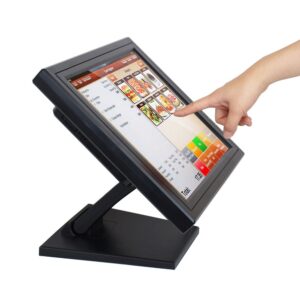
Essae 816J POS: Features, Specifications & Benefits Contact Now Know More Choosing the right point-of-sale system can make a significant difference to the speed and efficiency of daily business operations. The Essae 816J POS is a professional touch POS solution designed for retail and hospitality businesses that need reliable billing, inventory management, and customer service operations from a single workstation. With a large 15.6-inch TFT LCD display, Intel Elkhart Lake platform, DDR4 memory, M.2 NVMe SSD storage, and multiple connectivity options, the Essae 816J is built to support modern POS software and everyday commercial workloads. What Is the Essae 816J POS? The Essae 816J POS is a Windows-based touch POS terminal designed for businesses that require a dedicated and reliable billing workstation. Its integrated touchscreen design provides a clean and professional setup for checkout counters while reducing the need for a separate monitor and computer. The system is suitable for applications such as retail billing, restaurant POS operations, inventory management, customer service, and other business workflows that depend on a responsive POS interface. Its combination of commercial-grade hardware, touchscreen operation, and multiple connectivity ports makes it a versatile option for businesses looking to modernize their billing environment. Key Features of the Essae 816J POS 15.6-Inch TFT LCD Display The Essae 816J POS features a 15.6-inch TFT LCD display that provides a spacious interface for POS applications. A larger display can make product selection, billing screens, inventory information, and other software functions easier for operators to navigate. The touchscreen format also provides a clean and professional checkout experience. Intel Elkhart Lake Platform The system is powered by an Intel Elkhart Lake platform designed for efficient commercial computing. This provides the processing foundation required for running POS applications, billing software, inventory systems, and other everyday business applications. 4GB DDR4 Memory The Essae 816J includes 4GB DDR4 memory, providing the system with resources for running supported POS applications and routine business tasks. Memory requirements can vary depending on the POS software, operating system, peripherals, and number of applications being used simultaneously. M.2 NVMe SSD Storage The system supports 128GB or 256GB M.2 NVMe SSD storage, depending on the configuration. NVMe SSD storage can provide faster system responsiveness compared with traditional hard-drive storage, helping the POS terminal start applications and access stored data efficiently. Multiple Connectivity Options A POS terminal needs to communicate with several business peripherals. The Essae 816J POS provides a range of connectivity options, including: USB Serial HDMI LAN Audio Wi-Fi Bluetooth These connectivity options provide flexibility when connecting compatible printers, scanners, networking equipment, displays, and other POS accessories. Benefits of Using the Essae 816J POS Faster Billing Operations A responsive touchscreen POS terminal can help cashiers select products, process transactions, and complete billing efficiently. This can be particularly valuable during busy periods when businesses need to keep checkout queues moving. Professional Checkout Setup The all-in-one touchscreen design creates a clean and organized billing counter. Instead of using a separate desktop computer and monitor, businesses can use a dedicated POS terminal designed specifically for commercial environments. Flexible Peripheral Connectivity Retail and hospitality businesses often use multiple devices alongside their POS system. USB, serial, LAN, Wi-Fi, Bluetooth, and HDMI connectivity can provide flexibility for connecting compatible peripherals and business equipment. Suitable for Modern POS Software The hardware configuration of the Essae 816J POS is designed to support modern POS and billing applications. The exact software compatibility and performance depend on the software’s own system requirements. Where Can the Essae 816J POS Be Used? The Essae 816J POS can be suitable for several types of businesses. Retail Stores Retail businesses can use the system for product billing, customer transactions, inventory management, and sales operations. Supermarkets Supermarkets can benefit from a dedicated POS workstation for high-frequency checkout operations and integration with compatible barcode scanners, receipt printers, and other peripherals. Restaurants and Cafés Restaurants and cafés can use touch POS systems to manage orders, billing, and customer transactions through compatible restaurant management software. Pharmacies Pharmacies can use POS systems for billing and inventory-related workflows, subject to the capabilities of their selected software. Hospitality Businesses Hotels and other hospitality businesses can integrate touch POS terminals into suitable billing and management workflows. Essae 816J POS Specifications Specification Details Display 15.6-inch TFT LCD Processor Platform Intel Elkhart Lake Memory 4GB DDR4 Storage 128GB / 256GB M.2 NVMe SSD Connectivity USB, Serial, HDMI, LAN, Audio Wireless Connectivity Wi-Fi, Bluetooth Application Retail and hospitality POS Configurations and software compatibility may vary. Confirm the exact configuration with Linus Business Solutions before purchase. What Can You Connect to a Touch POS? A modern POS terminal often works as the central component of a complete billing setup. Depending on the software and hardware configuration, businesses may connect compatible devices such as: Barcode scanners Thermal receipt printers Cash drawers Customer displays Network devices Payment peripherals Other POS accessories The available ports and wireless connectivity of the Essae 816J POS provide flexibility for building a business-specific POS environment. What Should You Consider Before Buying a POS Machine? Before choosing a POS terminal, businesses should consider more than just the screen size or processor. Important factors include: POS software requirements Number of daily transactions Required storage Memory requirements Peripheral compatibility Network connectivity Available ports Counter space After-sales support Installation and software configuration Choosing the hardware based on the actual business workflow can help prevent compatibility issues and unnecessary costs. Why Choose Essae 816J POS for Your Business? The Essae 816J POS combines a large touchscreen display, commercial-oriented computing hardware, SSD storage, and versatile connectivity in a professional POS terminal. Its design makes it suitable for businesses looking for a dedicated workstation for billing, retail management, restaurant operations, and customer service. For businesses planning to upgrade from traditional billing systems to a modern touchscreen POS environment, the Essae 816J can be considered as part of a complete POS solution. Get Essae 816J POS in Hyderabad Looking for an Essae 816J POS in Hyderabad? Linus Business Solutions provides POS systems and business automation solutions for retail, hospitality,

Touch POS And Cash Drawer | Linus Business Solutions
Touch POS

Touch POS & Cash Drawer – Smart Billing Solutions for Retail Stores

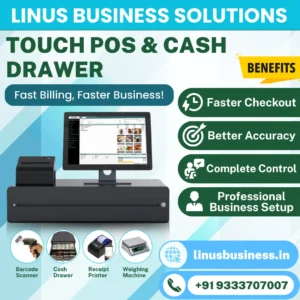
🧾 Touch POS and Cash Drawer – The Complete Billing Solution for Modern Retail ✅ Introduction In today’s fast-paced retail world, every second counts. That’s why businesses are switching to Touch POS and Cash Drawer systems for faster, more secure, and smarter billing. Whether you run a grocery store, supermarket, restaurant, or small shop, these tools can transform the way you do business. ✅ What is a Touch POS System? A Touch POS (Point of Sale) system is a touchscreen-based billing machine. It helps you manage sales, generate GST-compliant invoices, and keep track of stock — all in one device. 📌 Key Features of Touch POS: Easy-to-use touchscreen interface Fast and accurate billing Real-time inventory tracking Multiple payment options: UPI, card, cash Ideal for all types of retail and food businesses ✅ What is a Cash Drawer? A Cash Drawer is a secure storage device used to handle cash transactions. It connects with your POS system and opens automatically when a sale is made. 📌 Key Benefits of Cash Drawers: Safe and organized cash handling Reduces the risk of theft Separate slots for coins and notes Opens only during billing for better control Durable and easy to use ✅ Why Use Touch POS and Cash Drawer Together? When you combine a Touch POS and Cash Drawer, you get a complete billing solution that boosts productivity, enhances security, and improves customer experience. 📈 Business Benefits: Faster checkout process Fewer billing errors Better cash management Professional retail setup Increased trust with customers ✅ Who Should Use This Setup? This solution is perfect for: Retail stores Supermarkets Kirana shops Bakeries and cafés Restaurants Electronics shops Fashion and apparel stores ✅ Book a Free Online Demo Still unsure if this is right for your business? Don’t worry — we offer a free online demo to help you understand how Touch POS and Cash Drawer can work for you. 📞 Contact us today at www.linusbusiness.in and book your personalized session. ✅ Final Thoughts If you’re looking to speed up billing, secure your cash, and manage your store more efficiently, Touch POS and Cash Drawer is the best combination for your business. Make the smart move today — go digital, stay competitive! Know More Contact Us

Touch POS At Linus Business Solutions
Touch POS

Best Touch POS Machines in Hyderabad – Linus Business Solutions

🖥️ Top Touch POS Machines in Hyderabad – Linus Business Solutions Running a retail store, restaurant, or supermarket in Hyderabad? A Touch POS machine can make your billing faster, smarter, and more accurate. At Linus Business Solutions, we offer the best POS machines that are simple to use and full of smart features to help you grow your business. ✅ What is a Touch POS Machine? A Touch POS (Point of Sale) machine is a smart billing device with a touch screen that helps businesses manage sales, print invoices, and track inventory. It replaces manual billing with automated, digital billing and is used in retail shops, cafés, salons, and more. 🔍 Why You Need a Touch POS Machine for Your Business Touch POS systems offer speed and accuracy, reducing errors in billing. Here’s why many Hyderabad businesses are switching: Fast Billing: No more long queues. Bill your customers quickly. Inventory Tracking: Know what’s in stock and get alerts when items are low. GST-Ready Invoicing: Generate GST bills in seconds. User-Friendly Interface: Easy to use, even for non-tech staff. Daily Reports: Check sales reports on the go. 🏪 Industries We Serve Across Hyderabad We deliver custom Touch POS systems for: Retail Shops Restaurants & Cafés Supermarkets Salons & Boutiques Pharmacies Whether you own a small store or a multi-location business, we’ve got a POS that fits your needs. 💰 What’s the Price of Touch POS in Hyderabad? At Linus Business Solutions, our Touch POS machines start at ₹33,000. You get both software and hardware, ready for plug-and-play billing. We also offer customization, on-site setup, and training. 🔧 Complete Installation and Support We don’t just sell. We install, train, and support you every step of the way. Our team is based in Secunderabad, Hyderabad, and offers fast response times and free demos across Telangana. 📞 Get a Free Demo Today! Looking to buy a Touch POS Machine in Hyderabad?👉 Call us now for a free demo and consultation.📍 Visit us at Archana Arcade, Secunderabad 🔑 Why Choose Linus Business Solutions? 10+ Years of Industry Experience Trusted by 500+ Businesses Full On-Site Installation & Service Affordable POS Pricing Free Lifetime Updates (on selected models) 🚀 Final Words A good billing machine can speed up your service, reduce mistakes, and improve customer satisfaction. If you’re searching for Top POS Dealers in Hyderabad, look no further than Linus Business Solutions. Know More Contact Now

Scroll to Top